
Wedding Table Numbers
Wedding table numbers are the cards that tell guests which table is which. This tool prints them as a PDF from a number range or your own table names, as 4 x 6 in tent cards, 5 x 7 in flat cards or full pages on US Letter or A4. A range can start at 0 and runs up to 500 tables.
Free · runs in your browser · nothing is uploaded
Recent
Your last 10 settings, saved only in this browser. Nothing is uploaded.
Wedding table numbers are the cards that tell guests which table is which. This page prints them from a range such as 1 to 12 or from your own table names, as 4 x 6 in tent cards that fold in half, as flat 5 x 7 in cards, or as full pages. Pick Letter or A4 and a design, and the counters show how many cards and sheets the print needs. A range can start at 0 and runs up to 500 tables. In the default setup a tent card prints its number 1.05 in high, and a long name shrinks until it fits the face. The tool prints plain labels and does not know which guest sits at which table.
Open the tool, enter your table range or table names, check the counters, and then click Download PDF.
At a glance
Wedding table numbers are the cards that tell guests which table is which. This tool prints them as a PDF from a range such as 1 to 12 or from your own table names, as 4 x 6 in tent cards, flat 5 x 7 in cards or full pages.
- A range can start at 0 and runs up to 500 tables.
- In the default setup a tent card prints its number 1.05 in high.
- A 4 x 6 in tent card is printed as one flat card with a dashed fold line at 3 in.
- A tent sheet and a 5 x 7 sheet hold 2 cards on both Letter and A4, and a full page holds 1.
- The tool prints plain labels and does not know which guest sits at which table.
- The print scaling should be set to Actual size / 100 percent, not Fit to page, so the cards keep their measured size.
Last checked:
How to use the Wedding Table Numbers tool
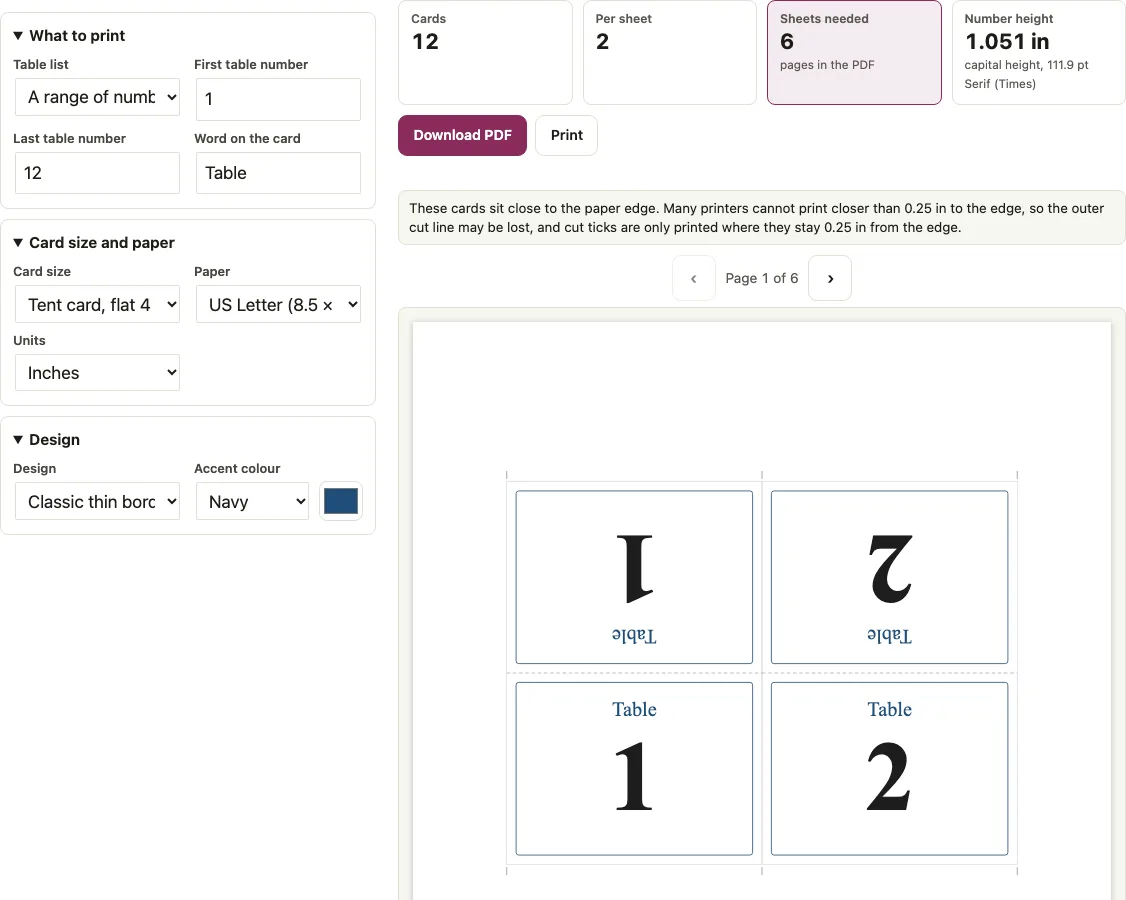
- Choose a mode. Use the range mode to enter a “First table number” and a “Last table number” (a range can start at 0 and runs up to 500 tables). Use the list mode to type “Table names”, one per line or separated by commas. The default range is 1 to 12, and the default list is Rose, Lily, Oak, Willow.
- Set the word on the card in “Word on the card”. It starts as “Table”, and you can change it or empty the field.
- Open the “Card size” menu and pick “Tent card, flat 4 x 6 in, folded in half”, “Flat card 5 x 7 in” or “Full page”.
- Choose US Letter or A4 as the paper.
- Pick one of five designs and one of five accent colours, or select Custom colour.
- Check the preview and the counters “Cards”, “Per sheet”, “Sheets needed” (with the pages in the PDF) and “Number height”, the capital height of your longest label.
- Click “Download PDF” to save seatlark-table-numbers.pdf, or click “Print”. Set the print scaling to Actual size / 100 percent, not Fit to page, so the cards keep their measured size.
The tool keeps your settings in the address bar and in this browser, so a saved link reopens with the same size, design and paper.
Should wedding table numbers be 4x6 or 5x7?
Pick the 4 x 6 in tent if the number should show on both sides of a card that stands up, and the 5 x 7 in flat card if you want one larger number on a card that lies flat or sits in a holder. The tent prints a number about 1.05 in high and the 5 x 7 card about 2.67 in. The counter “Number height” shows the figure for the longest label you entered. Sheet counts are in the table.
| Card size | Capital height of the number (default Classic design, with “Table”) | Cards per sheet, Letter | Cards per sheet, A4 | Sheets for 12 tables |
|---|---|---|---|---|
| Tent card, 4 x 6 in, folded | 1.05 in (111.9 pt), same for 1, 12 and 112 | 2 | 2 | 6 |
| Flat card 5 x 7 in | 2.67 in for “1”, 2.58 in for “12” | 2 | 2 | 6 |
| Full page | 3.78 in (402.2 pt) | 1 | 1 | 12 |
The height is the point size times the cap height of the font that is printed: 0.676 em for Times Bold in the Classic, Double frame and Botanical designs, and 0.718 em for Helvetica Bold in the Modern and Monogram designs. Without the word on the card, the tent number grows to 139.9 pt, which is 1.31 in.
How do you number tables for a wedding?
In range mode the tool numbers the tables one after another from the first to the last number you enter, starting at 1, at 0 or anywhere else. In list mode you type the labels yourself, one per line or separated by commas, so names, letters or a mix work. The tool does not decide the order.
| Label on the 4 x 6 tent | Printed size |
|---|---|
| Rose | 111.9 pt |
| Willow | 78.1 pt |
| Sunset Vineyard | 57.2 pt |
| Maximilian and Alexandra | 38.1 pt |
How a 4x6 tent card folds
A 4 x 6 in tent card is printed as one flat card with a dashed fold line at 3 in. The lower 4 x 3 in half is the front face. The upper half is drawn turned 180 degrees about its own centre, so after the fold it reads upright from the other side too.
- Cut along the light outlines. Cut ticks are printed only where they stay 0.25 in from the paper edge.
- Fold along the dashed grey fold line at 3 in.
- Stand the card on the table so either face reads upright.
On US Letter two tent cards stand side by side. They sit close to the paper edge, so the tool shows a note: many printers cannot print closer than 0.25 in to the edge and the outer cut line may be lost. On A4 two 4 in cards do not fit side by side, so the tool turns the whole card, text included, by 90 degrees and puts two on the sheet one above the other. The 5 x 7 in card is turned in the same way on Letter and A4, which gives 2 per sheet.
Short answers to common questions
What size should my table numbers be?
On the default design the tent 4 x 6 card prints a number about 1.05 in high, the 5 x 7 card about 2.67 in, and a full page about 3.78 in. Choose by how far away guests will read it.
Do table numbers need to be double sided?
A folded tent card shows the number on both faces because its upper half is printed turned 180 degrees. Flat 5 x 7 cards and full pages are single-face prints, so use the tent card if you need both sides.
How many table numbers fit on one page?
A tent sheet and a 5 x 7 sheet hold 2 cards on both Letter and A4, and a full page holds 1. For tent or 5 x 7 cards, 4 tables need 2 sheets, 8 need 4, 10 need 5, 12 need 6, 20 need 10 and 50 need 25. With full pages, 12 tables need 12 sheets.
Can table numbers be names instead of numbers?
Yes. Use the list mode and type names such as Rose, Lily or Sunset Vineyard. Names shrink to fit the face: “Rose” prints at 111.9 pt, “Willow” at 78.1 pt, and “Sunset Vineyard” at 57.2 pt on the 4 x 6 tent.
Can I remove the word Table from the card?
Yes. Empty the “Word on the card” field, and the digit on a tent card grows to 139.9 pt.
Can the table numbers match my place cards and escort cards?
Yes. Use the same labels in the “Name; table” lines of the escort card and place card pages, and the cards agree.
Can I use accents, Chinese characters or emoji in table names?
You can, but text outside the standard PDF fonts is drawn as a sharp image. It prints well, but it cannot be selected or searched in the PDF.
How do you number tables for a wedding?
In range mode the tool numbers the tables one after another from the first to the last number you enter, starting at 1, at 0 or anywhere else. In list mode you type the labels yourself, one per line or separated by commas, so names, letters or a mix work. The tool does not decide the order.
Related tools
- Wedding place cards: use these when each guest also needs a card at the seat, with the same table number.
- Escort cards: use these when guests pick up a card that tells them which table to find.
- Wedding seating chart sign: use this for the poster that lists who sits at each table.
- Alphabetical seating chart: use this for an A-Z find-your-seat sign guests can scan quickly.
- Table tent cards: use these for a fold-over card with your own wording instead of a number.
- Wedding seating chart maker: use this to draw the tables and seat the guests before you number the cards.
- Wedding reception layout: use this to see how many round tables fit the room.
- Tablecloth size calculator: use this to buy the right tablecloth for the tables that carry these numbers.