
Wedding Seating Chart Maker
Make a wedding seating chart by drawing the reception, adding the guest list, setting rules and pressing Auto-seat. The tool draws the room for your head count, and the PDF ends with a find-your-seat list. The venue and the local fire code have the final say on spacing.
Free · runs in your browser · nothing is uploaded
Recent
Your last 10 settings, saved only in this browser. Nothing is uploaded.
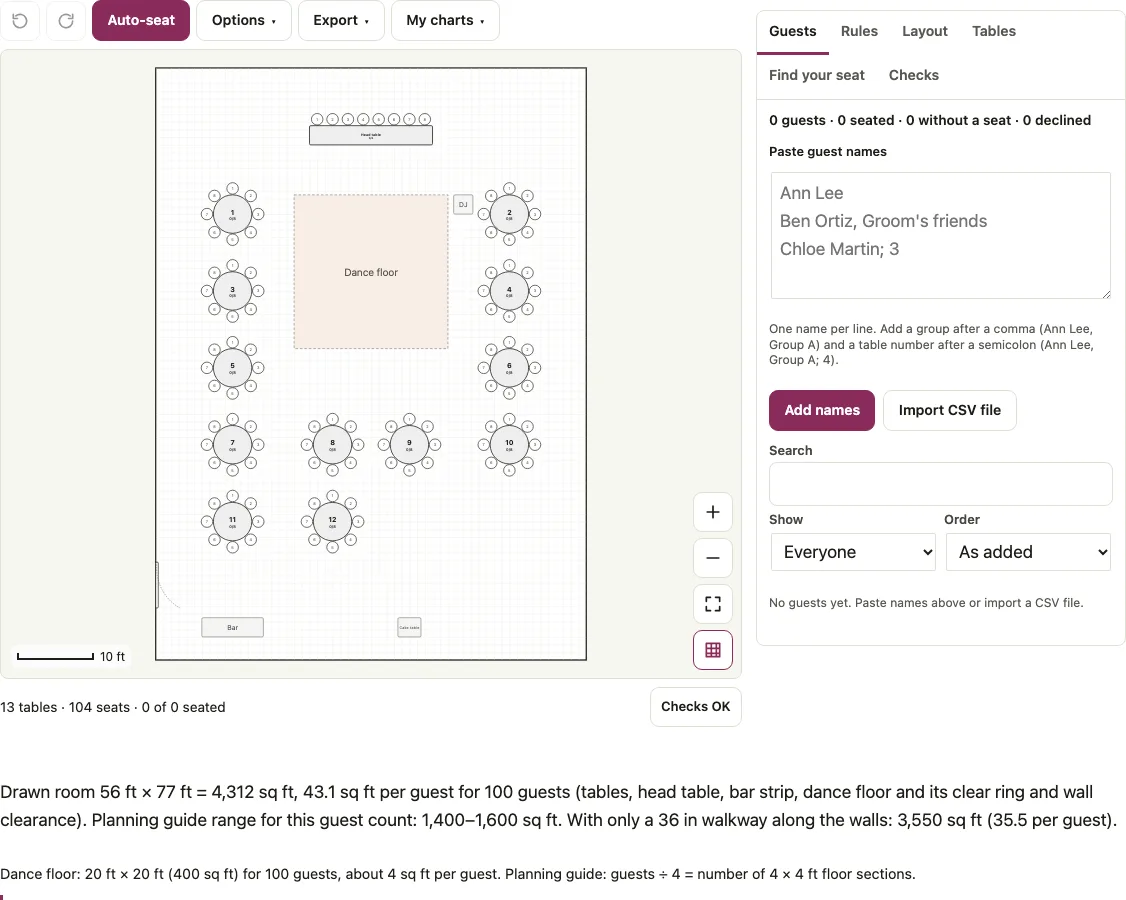
A wedding seating chart maker should start from the reception, not from a blank page. This one opens on a ballroom of 56 x 77 ft drawn for 100 guests: a head table of 8, a 20 x 20 ft dance floor, 12 round tables of 8, a bar, a cake table and a door, 13 tables and 104 seats in all. Paste the guest list, mark couples and groups, add keep-apart rules and press Auto-seat. The Checks tab compares seats with guests and flags tables that sit too close. The PDF ends with a find-your-seat list in A to Z order, so the same plan gives you a reception seating chart and a sign.
Open the chart, paste your guest list on the Guests tab, and press Auto-seat once the room is set.
At a glance
A wedding seating chart assigns each guest to a table and seat for the reception. This tool draws the room from your head count, seats guests with Auto-seat, and exports a PDF with a find-your-seat list.
- The starting ballroom is drawn at 56 x 77 ft for 100 guests, with 13 tables and 104 seats in all.
- The dance floor is sized at 4 sq ft per guest, rounded up to whole 4 ft sections.
- Auto-seat seats as many people as the seats allow, keeps must-rules, keeps parties together, keeps soft rules, then keeps groups together.
- Auto-seat never moves a locked guest and never puts more people at a table than it has seats.
- For small lists, up to 14 people still waiting for a seat and 45 guests in all, the search is exhaustive, so the result is the best possible.
Last checked:
How to use the wedding seating chart maker
- On the Guests tab paste one name per line and press Add names. A comma adds a group (“Ben Ortiz, Groom’s friends”). Names written Last, First go in with Import CSV file.
- Press the pencil button next to a name to set Party / couple (type the same text for both partners), Group, Meal and RSVP.
- On the Layout tab fill in Starting layout: Guests, Room type, Top table, Table shape, Seats per table and Dance floor, then press Build this layout. Names stay; everyone needs a seat again.
- Seat the wedding party at the head table by hand and press the lock button next to each name. With Keep the head table for the wedding party ticked in Options (the default here), Auto-seat never adds anybody to the head table.
- On the Rules tab choose “Sit at the same table” or “Keep at different tables”, pick the two people or groups and tick Must if the rule is firm.
- Open Options, choose a Seating order, then press Auto-seat.
- Read Checks, then open Find your seat and type a name to test the lookup.
- In Export choose a Paper size and Download PDF, or Print. PNG, SVG, print and PDF carry a scale bar and the room size.
Drag a name by its handle onto a seat to move it by hand; dropping on an occupied seat swaps the two people. Undo and Redo are above the chart.
How do I make a wedding seating chart?
Work in this order: room and tables, guest list, rules, seating, checks. The room comes first because the number of tables follows from the head count and seats per table. Auto-seat then does the bulk of the work and you adjust by hand.
Here is a 100-guest chart built with the tool code (seed 1, order “Keep groups and parties together”):
| Part | Setup |
|---|---|
| Seats | 13 tables, 104 seats: head table of 8 and 12 round tables of 8 |
| Wedding party | 8 people, the couple plus 6, locked at the head table |
| Guests | 92 in five groups: Bride family 24, Groom family 22, College friends 18, Work 16, Neighbors 12 |
| Couples | 14, marked with Party / couple |
| Rules | 4 keep-apart (2 must, 2 soft) and 2 sit-together (must) |
The result: all 100 seated, no couple split, no rule broken, and the 8 locked people still at the head table. Seeds 2 and 3 gave the same outcome, and repeating seed 1 returned an identical chart.
Who sits where at a wedding?
Couples and households usually sit together, the couple takes a head table or a sweetheart table, and people who would be uncomfortable together go to different tables. Beyond that it is your call. The tool supports each habit with a setting: Party / couple, Group, Top table and rules.
Under Options, “Keep the head table for the wedding party” is ticked by default on this page: Auto-seat leaves the people already at the head or sweetheart table where they are and adds nobody else, and the status line says so. With 100 guests and nobody seated there, that means the 8 head-table seats stay empty and 4 guests are left without a seat, so seat the wedding party first. Untick the option if Auto-seat should use the head table’s free seats; unticked, it put 8 ordinary guests there in our test. Locking someone at the head table does not change this while the option is on.
Seating rules that auto-seat keeps
Auto-seat works through its goals in a fixed order: seat as many people as the seats allow, keep must-rules, keep parties together, keep soft rules, then keep groups together. It never moves a locked guest and never puts more people at a table than it has seats. “Together” means the same table, not neighbouring chairs.
In the example, switching the order to “A to Z by last name” split all 14 couples and broke 2 must-rules, because that order fills tables in sequence and does not apply rules or parties. Checks lists the broken rules. “Balanced” and “Random” also finished with no broken rule.
For small lists (up to 14 people still waiting for a seat, 45 guests in all) the search is exhaustive, so the result is the best possible. Larger lists such as the 100-guest example use a heuristic search with restarts. The status line then says how many must-rule pairs or wishes could not be met, so you can see what is left.
What changes with the room and the head count?
The Starting layout draws a dance floor from the guest count: 4 sq ft per guest rounded up to whole 4 ft sections. A hundred guests get 20 x 20 ft, which is 400 sq ft. Under the chart the page also prints the drawn room (for 100 guests 56 x 77 ft, 4,312 sq ft, 43.1 sq ft per guest) and the planning range from a rental guide. The wedding reception layout page explains those figures, with the dance floor table by head count and the barn and tent sizes.
What if there are more guests than seats?
With the default head table held for the wedding party, Checks counts only the usable seats: “110 people but only 96 seats: add 14 seats. (8 head-table seats are kept free for the wedding party.)” Auto-seat seats 96 and leaves 14 without a seat. Add a table in the Layout tab or raise the Seats number of a table, then run it again. Guests marked Declined are left out of the seating and out of that count.
How this tool works and where the numbers come from
Spacing and dance floor figures are planning figures from published event set-up guides (Oak Street Mfg., Tripleseat, Party Rental Ltd., Bright Event Rentals, Palais des congres de Montreal). The venue and the local fire code have the final say.
Sources
Short answers to common questions
Can I import my guest list?
Yes. Paste names one per line, or use Import CSV file. The CSV reader recognises name (or first and last name), group, party, meal, rsvp, table, seat and note columns.
Can I use this on my phone?
Yes. Tap a name, then tap a seat. Two fingers move around the room, and the zoom buttons or a pinch change the scale.
How do I keep the head table for the wedding party?
Seat those people at the head table first. The Options setting “Keep the head table for the wedding party” is on by default, so Auto-seat adds nobody else there. Untick it, or lock one of them, only if Auto-seat may use free head-table seats.
How do I keep two guests apart?
Open Rules, choose “Keep at different tables”, pick the two people (or a person and a group) and tick Must if it is firm. The rule shows met, waiting for seats or broken.
Will my work be saved if I close the browser?
Every chart is saved in its own slot in this browser. The My charts menu in the toolbar renames, opens, duplicates or deletes charts, and Save plan file downloads a copy for another device.
How do I print a find-your-seat list?
The Find your seat tab has Print and Copy seating list. The PDF repeats the chart, the seating list by table and an A to Z list such as “Hugo Brandt - Table 1”. For a wall sign pick Poster 18 x 24 in or 24 x 36 in under Paper size.
Can I print at home or use names in other languages?
Letter and A4 suit a home printer. Basic Western letters are real text in the PDF; Chinese, Arabic or emoji names are drawn as images and cannot be selected. PNG, SVG and CSV keep every name as typed.
How do I make a wedding seating chart?
Work in this order: room and tables, guest list, rules, seating, checks. The room comes first because the number of tables follows from the head count and seats per table. Auto-seat then does the bulk of the work and you adjust by hand.
Related tools
- Wedding seating chart template: to start from a round, rectangle or sweetheart layout.
- Wedding reception layout: to size the room, tables and dance floor before you seat anyone.
- Table seating chart: to fill tables from a list, table by table.
- Alphabetical seating chart: to turn the finished seating into an A to Z find-your-seat sign.
- Wedding seating chart sign: for a poster-size list of tables at the entrance.
- Wedding table numbers: for the numbers that stand on each table.
- Wedding place cards: when guests find their own chair by name.
- Escort cards: when each guest picks up a card with a table number.
- Wedding guest list template: to track RSVPs before the seating starts.
- Seating chart maker: for any other event, from a blank room.