
Wedding Seating Chart Template
A wedding seating chart template is a drawn plan of tables and seats that you edit on the page and print. Choose one of six layouts sized to your guest count, from 2 to 600 guests. The venue has the final say on spacing and capacity.
Free · runs in your browser · nothing is uploaded
Recent
Your last 10 settings, saved only in this browser. Nothing is uploaded.
At a glance
A wedding seating chart template is a drawn plan of tables and seats that you can edit and print. This page offers six layouts for 2 to 600 guests, with table numbers and seat numbers already drawn.
- The default guest count is 100.
- Each layout is built for your guest count, from 2 to 600 guests.
- Rounds of 8 are 60 in across and give 23.56 in of table edge per seat.
- Paper size options are Letter, A4, Poster 18 x 24 in or Poster 24 x 36 in.
- The Checks tab warns when dining tables are closer than 5 ft, or a seat gets under 20 in of table edge.
Last checked:
How to use the wedding seating chart template
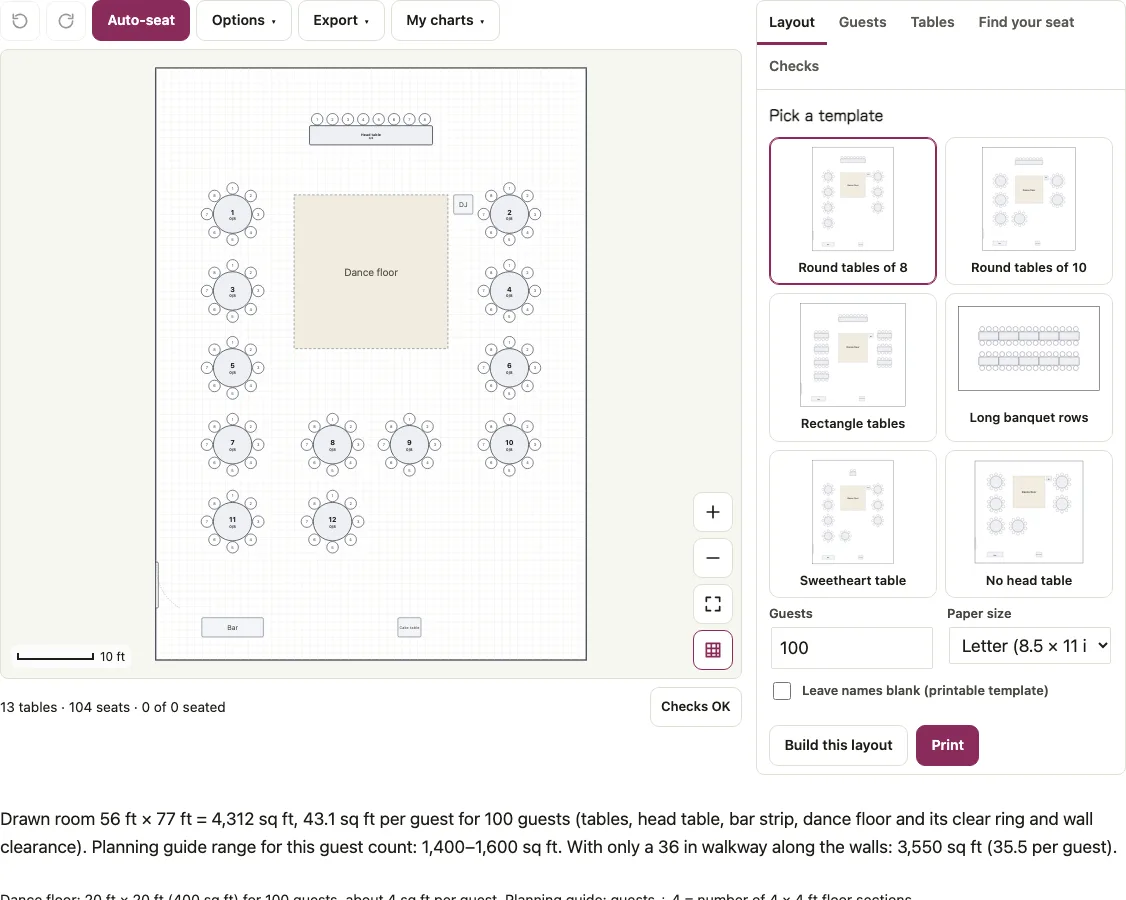
- Under Pick a template click one of the thumbnails: Round tables of 8, Round tables of 10, Rectangle tables, Long banquet rows, Sweetheart table or No head table. The layout is built at once.
- Type your head count in Guests and press Build this layout to redraw it.
- Drag a table to move it, or select it to change its seats, shape, size or rotation in the Layout tab. Add a dance floor, bar or door from Add to the room.
- To seat people, open Guests, paste one name per line, press Add names, then press Auto-seat. The Tables tab shows each table with its seat numbers.
- Choose Paper size: Letter, A4, Poster 18 x 24 in or Poster 24 x 36 in.
- Tick Leave names blank (printable template) if you want to write names by hand, then press Print. Export also has Download PDF and Download PNG.
The Find your seat tab lists seated guests A to Z with their table. The PDF carries that list after the seating list by table. Save plan file in the Export menu keeps your edited template, and Undo reverses a rebuild. Switching to another thumbnail rebuilds the layout from scratch, so edits to the previous one are replaced.
Six wedding seating chart templates
For 100 guests the six layouts come out like this. Counts include the head or sweetheart table where there is one, and rooms are the ballroom the tool draws around them, with 6 ft from chair backs to the walls.
| Template | Tables | Seats | Room |
|---|---|---|---|
| Round tables of 8 | 13 (head table + 12 rounds) | 104 | 56 x 77 ft |
| Round tables of 10 | 11 (head table + 10 rounds) | 108 | 58 x 71 ft |
| Rectangle tables | 13 (head table + 12 rectangles of 8) | 104 | 62 x 64 ft |
| Long banquet rows | 17 tables of 6 | 102 | 70 x 25 ft |
| Sweetheart table | 14 (table for 2 + 13 rounds of 8) | 106 | 56 x 77 ft |
| No head table | 10 rounds of 10 | 100 | 58 x 62 ft |
At 150 guests the same six need 19, 16, 19, 25, 20 and 15 tables, with 152, 158, 152, 150, 154 and 150 seats. At 40 guests the round-of-8 layout is 5 tables and 40 seats.
What is a normal seating chart for a wedding?
There is no single standard. The templates cover the usual choices: a head table or a sweetheart table for the couple, or none, with guest tables of 8 or 10, rectangles, or long banquet rows. Pick by room and head count, then adjust. The number of seats can exceed the head count by a few, as the table above shows, so spare seats are normal.
Which table size does each template use?
Rounds of 8 are 60 in across and give 23.56 in of table edge per seat. Rounds of 10 are 72 in across and give 22.62 in. Rectangles for 8 measure 96 x 30 in with 24 in per seat, and the banquet rows use 72 x 30 in tables with 3 seats a side. Tripleseat’s chart lists 60 in rounds for 6 to 8 people and 72 in for 8 to 10, so the 10-seat layout sits at the top of that range. The Checks tab warns when dining tables are closer than 5 ft, or a seat gets under 20 in of table edge. The venue has the final say on both.
How do I print the template as a poster?
Choose Poster 18 x 24 in or Poster 24 x 36 in under Paper size, then use Download PDF. Page 1 is the chart as vector drawing with table numbers, seat numbers and, once names are added, the seats taken at each table, such as 8/8. A blank chart prints no counts on the drawing. The next pages hold the seating list by table and the A to Z find-your-seat list. At Letter size the chart is small, so poster paper is the better choice for a display.
How this tool works and where the numbers come from
Table sizes and seat counts follow published event table charts (Tripleseat, Party Rental Ltd.) and the spacing and dance floor figures come from event set-up guides. The venue has the final say on spacing and capacity.
Sources
Short answers to common questions
What is the best way to make a seating chart for a wedding?
Start from the template closest to your room, set the head count, add the guest list, and let Auto-seat place people before you adjust by hand. Add rules for people who must sit together or apart. Open the wedding seating chart page to work through that with parties and rules.
Can I get the template as a Word or Excel file?
No. Downloads are PDF, PNG, SVG, a CSV guest list and a plan file you can reopen. For a spreadsheet with a table column use the seating chart template for Excel.
Can I print the template blank?
Yes. Tick Leave names blank (printable template) and print or download the PDF. The tables keep their numbers and numbered seats, so names can be written in.
Can I change a template after it is built?
Yes. Drag tables, change the seats and size of any table, add or delete tables and room items, and change the room size. Undo brings back the previous layout if you rebuild by mistake.
Will my work be saved if I close the browser?
Every chart is saved in its own slot in this browser. The My charts menu in the toolbar renames, opens, duplicates or deletes charts, and Save plan file downloads a copy for another device.
Can I print my seating chart template and create a poster to display at my wedding?
Choose Poster 18 x 24 in or Poster 24 x 36 in under Paper size, then use Download PDF. Page 1 is the chart as vector drawing with table numbers and seat numbers. Poster paper is the better choice for a display, because the chart is small at Letter size.
Related tools
- Wedding seating chart: when the layout is chosen and you are ready to seat the guests.
- Seating chart template: for non-wedding layouts such as classroom rows or a U-shape.
- Seating chart template for Excel: if you want the guest list in a spreadsheet with a table column.
- Wedding seating chart sign: for a big display of who sits at which table.
- Wedding table numbers: for numbers that match the template.
- Wedding reception layout: to check the room size and dance floor for the layout you picked.
- Wedding guest list template: to collect the names the template will seat.
- Alphabetical seating chart: for an A to Z list sorted by last name.