
Wedding Seating Chart Sign
To make a wedding seating chart sign, paste each guest as Name; table and download a PDF poster listing every table. The poster is one page at 18 x 24 in, 24 x 36 in, A2, A3 or Tabloid size. The key limit: guests without a table are left off the sign, and only the first 2000 lines are used.
Free · runs in your browser · nothing is uploaded
Recent
Your last 10 settings, saved only in this browser. Nothing is uploaded.
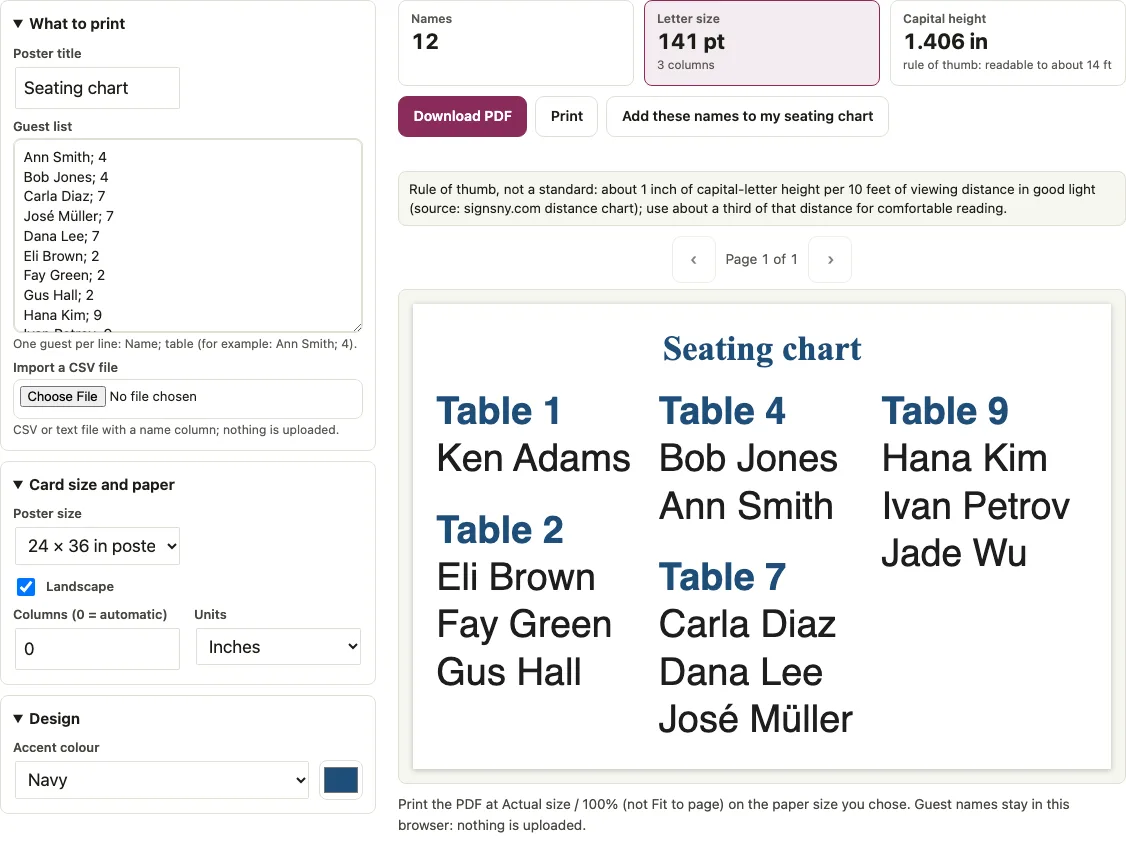
This tool turns your guest list into a wedding seating chart sign: a single-page PDF poster with one block for each table. You enter each guest on a line with a table number, such as Ann Smith; 4, and the poster lists every table with its guests in A to Z order by surname. Use it when you want a large sign that helps guests find their table at the reception. Guests without a table are left off this sign and appear only on the alphabetical sign. The tool picks the font size and column count for you, shows how large the letters are and how far away they can be read, and then exports the PDF at the poster size you chose.
Enter your guests one per line as Name; table in the tool, then click “Download PDF” to get your sign.
At a glance
A wedding seating chart sign is a single-page PDF poster with one block for each table, built from a guest list where each line reads Name; table, such as Ann Smith; 4.
- The sign uses the first 2000 lines of the guest list, and a note says how many were left out.
- The poster size choices are 18 x 24 in, 24 x 36 in, A2 (16.54 x 23.39 in), A3 sheet (11.69 x 16.54 in) or Tabloid sheet (11 x 17 in), and the default is 24 x 36 in.
- A warning appears when the letter size is under 14 pt.
- Guests without a table are left off this sign and appear only on the alphabetical sign.
- Capital height is font size x 0.718 / 72 in.
Last checked:
How to use the Wedding seating chart sign
- Enter your guests in the “Guest list” box, one guest per line in the form Name; table, for example Ann Smith; 4. Write names as First Last. The sign uses the first 2000 lines; a note says how many were left out.
- If your list is in a CSV file, select “Import a CSV file”. The tool reads a name column and a table column from it.
- Set “Poster title” to a new heading, or clear it to leave the title empty. The title defaults to “Seating chart”.
- Choose a size in “Poster size”: 18 x 24 in, 24 x 36 in, A2 (16.54 x 23.39 in), A3 sheet (11.69 x 16.54 in) or Tabloid sheet (11 x 17 in). The default is 24 x 36 in.
- Turn on “Landscape” to swap the page direction. The default is 24 x 36 in landscape (36 x 24 in page).
- Leave “Columns (0 = automatic)” at 0 so the tool picks 1 to 8 columns, or type a fixed number.
- Read the counters: “Names” (guests printed on this sign), “Letter size”, “Capital height” and the rule-of-thumb distance. A warning appears under 14 pt.
- If a seating chart is saved in this browser, the box is filled from it.
- Click “Download PDF”. It is one page at the size you chose.
Print at 100 percent or actual size so the letters keep their measured size.
Font size for an 18x24 sign
The font size on an 18 x 24 in sign should keep the capital letters readable from where guests stand. In the example below a portrait sign fits 50 guests at 35 pt and 200 guests at 19.4 pt. The figures were computed on invented lists with names of about 13 characters, 10 guests per table and automatic columns. The longest name and the tallest column set the size, not the average name, so use the “Letter size” counter for your own list.
| Guests | Poster (portrait) | Columns | Letter size | Capital height |
|---|---|---|---|---|
| 50 | 18 x 24 in | 3 | 35 pt | 0.35 in |
| 100 | 18 x 24 in | 3 | 24.3 pt | 0.24 in |
| 150 | 18 x 24 in | 4 | 23.5 pt | 0.23 in |
| 200 | 18 x 24 in | 4 | 19.4 pt | 0.19 in |
| 100 | 24 x 36 in | 3 | 36.9 pt | 0.37 in |
| 150 | 24 x 36 in | 4 | 31.3 pt | 0.31 in |
| 200 | 24 x 36 in | 4 | 29.5 pt | 0.29 in |
| 300 | 24 x 36 in | 5 | 23.9 pt | 0.24 in |
Landscape changes the result in both directions: 100 guests print at 26.5 pt in 5 columns (24.3 pt in portrait), 200 guests at 17.4 pt in 5 columns (19.4 pt in portrait). Capital height is font size x 0.718 / 72 in. “Use the N guests from my seating chart” reloads the chart’s guests, and “Add these names to my seating chart” adds missing names without changing existing guests. A note under the tool says how many guests without a table are not on the sign. Characters outside the standard PDF fonts are drawn as images.
How big should a wedding seating chart sign be?
Choose the largest size that fits your space, then check how far away the letters can be read. The tool’s rule of thumb comes from the signsny.com distance chart, which calls its values estimates: 1 inch of capital height can be read from up to about 10 feet in good light, and the chart’s shorter “maximum impact” distance, about a third of that, is used here as the comfortable-reading figure.
| Poster size | Dimensions (in) |
|---|---|
| 18 x 24 in | 18 x 24 |
| 24 x 36 in (default) | 24 x 36 |
| A2 | 16.54 x 23.39 |
| A3 sheet | 11.69 x 16.54 |
| Tabloid sheet | 11 x 17 |
The 12-guest sample on the default 24 x 36 landscape poster sets letters at 141 pt in 3 columns, a capital height of 1.41 in and a rule-of-thumb distance of 14 ft. For 150 guests on the same poster, automatic columns give 5 columns at 31.1 pt. Forcing 1 column shrinks the letters to 6.1 pt, so leave the column setting at automatic unless you have a reason to change it.
How do I make a wedding seating chart sign?
Prepare the list before you open the tool, so the layout comes out right the first time.
- Write each guest as First Last, with the table number after a semicolon.
- Give every guest who should appear on the sign a table number. Guests without one are skipped.
- Check that each table number is spelled the same way every time. Tables are sorted in natural order (1, 2, 10, then words like Rose).
- Pick the poster size from the room and the viewing distance you expect.
- Read the “Letter size” and “Capital height” counters, then adjust the size or columns until the letters are big enough.
Short answers to common questions
Do I need a seating chart sign at my wedding?
That is your choice. A seating chart sign shows each table with its guests in one place, so guests can find their table without asking. This tool builds that sign from the guest list you already have.
Should the sign be alphabetical or by table?
This sign is by table: each table is a block headed “Table 4” with its names in A to Z order by surname. If you want one A-Z list of every guest, use the alphabetical seating chart page, which uses the same list.
Which guests appear on this sign?
Only guests with a table number. Guests without a table are left off, a note under the tool says how many, and they appear on the alphabetical sign.
What happens if I write a name as Smith, Ann; 4?
A typed line is read with the comma as a separator, so the tool prints only “Smith”, and it shows a hint under the tool. Write names as First Last, for example Ann Smith; 4, or use the CSV import, which turns a quoted “Smith, Ann” cell into “Ann Smith”.
Can I print the seating chart sign at home?
An 18 x 24 or 24 x 36 in PDF is a print-shop size. A3 and Tabloid sheets print on printers that take those paper sizes. Ask for 100 percent or actual size.
How many names can the list hold?
Up to 2000 names. The sample list has 12 guests.
Can I change the title or leave it blank?
Yes. The title defaults to “Seating chart”, and you can change it in “Poster title” or empty it.
What does the warning under 14 pt mean?
The tool shows a warning when the letters fall under 14 pt. Check “Letter size”, then choose a larger poster size or change the column setting.
Related tools
- Alphabetical seating chart: Use it for one A-Z list of all guests instead of table blocks.
- Escort cards: Use them for small cards guests carry to the table.
- Wedding table numbers: Use them for the numbers on the tables.
- Wedding place cards: Use them for the card at each seat.
- Wedding seating chart maker: Use it to seat the guests first.
- Wedding seating chart template: Use it for a printable chart template with the room drawn.
- Table seating chart: Use it for a table-by-table banquet view.
- Wedding reception layout: Use it to plan the reception layout around the tables.