
Wedding Guest List Template
This wedding guest list template uses one row per named guest, with columns for list, party, plus-ones, RSVP, meal and table. Totals update as you type, and you can download the list as CSV or Excel. It does not send invitations or collect RSVPs, so you enter every reply yourself.
Free · runs in your browser · nothing is uploaded
Recent
Your last 10 settings, saved only in this browser. Nothing is uploaded.
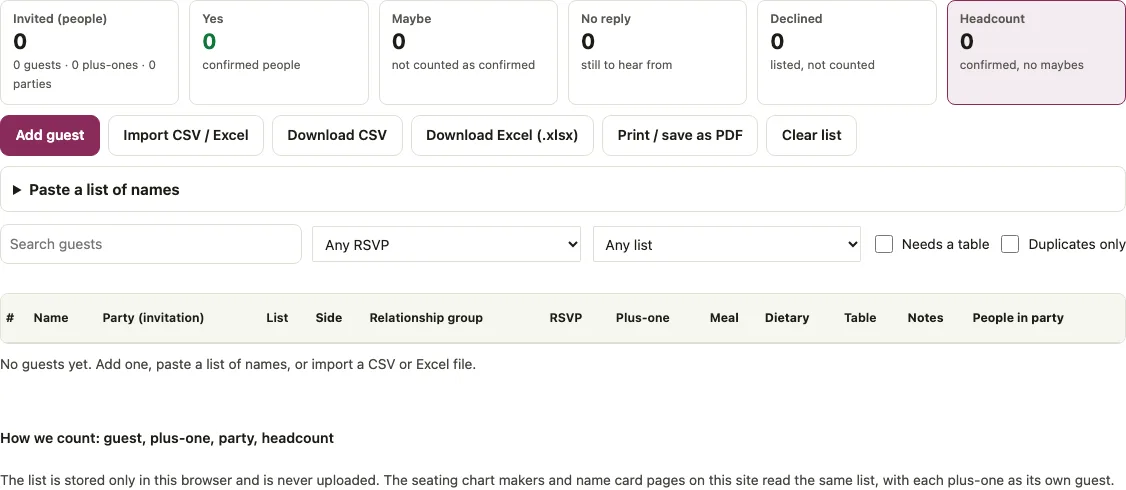
A wedding guest list template is only useful if it adds up for you, so this one is a tracker. Each row is one guest with List (A, B or C), Party, Plus-one, RSVP, Meal, Dietary and Table columns, and the totals bar above the grid shows invited, yes, maybe, no reply, declined and a headcount range as you type. Declined guests stay visible but are never counted or seated. Download the list as CSV or as an Excel file with a Totals sheet, or print it. The same list feeds the Seatlark seating chart and card pages, with every plus-one as its own guest, so names are typed once.
Open the tracker and click Add guest to start your list.
At a glance
A wedding guest list template is a tracker where each row is one guest with List, Party, Plus-one, RSVP, Meal, Dietary and Table columns. A totals bar above the grid shows invited, yes, maybe, no reply, declined and a headcount range as you type.
- The grid shows 100 rows per page.
- Plus-ones can be set from none up to +9 on each row.
- The list holds up to 5,000 rows.
- The list is saved in this browser as you type.
- The tracker does not email anyone, give guests an RSVP link or sync between devices.
Last checked:
How to use the wedding guest list tracker
- Add guests. Click Add guest for a blank row, or open Paste a list of names and paste one guest per line, with an optional comma and relationship group. To load a file, click Import CSV / Excel.
- Set List to A, B or C for each guest, or leave it blank.
- Type the same Party text on every row of one invitation, for example “Lee family”.
- Choose an RSVP: Yes, Maybe, No or No reply.
- Pick a Plus-one, from none up to +9, then fill in Meal, Dietary, Table and Notes.
- Read the totals bar: Invited (people), Yes, Maybe, No reply, Declined and Headcount.
- Narrow the grid with the search box, Any RSVP, Any list, Needs a table or Duplicates only.
- Save a copy with Download CSV or Download Excel (.xlsx), or use Print / save as PDF.
Click the headers Name, RSVP, Plus-one, Table, Relationship group, Party or List to sort, and click again to reverse. The grid shows 100 rows per page. Clear list asks for a second click, within five seconds, before it deletes every guest. The list is saved in this browser as you type, and the status line under the grid says when it is saved.
What columns does a wedding guest list template need?
This tracker uses one row per named guest with eleven columns: Name, Party (invitation), List, Side, Relationship group, RSVP, Plus-one, Meal, Dietary, Table and Notes. A twelfth column, People in party, is calculated for you. There are no address, email, phone or envelope-name columns, so keep mailing details in a separate file or in Notes.
When you import a spreadsheet, the first row is read as a header if it names a column. First Name plus Last Name are joined into one name, and headers such as Group, Relationship, Allergies or Guests are matched to the right column. Commas, semicolons, tabs and pipes are detected as separators.
How are the headcount and plus-ones counted?
Every number is a count of people. A plus-one is an extra, unnamed person who needs a seat, and a row marked No is left out of every headcount along with its plus-ones. Headcount runs from yes only up to yes plus maybe.
Here is an example list of eight rows. Ann Lee (list A, Yes, +1), Bob Lee (A, Yes), Cy Moss (A, No, +1), Di Poe (B, Maybe, +1), Ed Ray (B, no reply), Fay Tan (B, Yes), Gus Ung (C, no reply) and Hal Vox (no list, Maybe). The tracker reports:
| Measure | People |
|---|---|
| Invited | 11 |
| Yes | 4 |
| Maybe | 3 |
| No reply | 2 |
| Declined | 2 |
| Headcount | 4 to 7 |
The headcount is 4 if every maybe stays home and 7 if every maybe comes. The three plus-ones are inside those numbers, and the 8 rows make 7 parties because Ann and Bob share one.
What is a B-list for wedding guests?
The A-list is the people you must invite. B-list guests are invited later, only if A-list replies leave seats empty. The List column tags each guest, and the By list table breaks the same example down:
| List | Invited | Yes | Maybe | No reply | Declined |
|---|---|---|---|---|---|
| A | 5 | 3 | 0 | 0 | 2 |
| B | 4 | 1 | 2 | 1 | 0 |
| C | 1 | 0 | 0 | 1 | 0 |
| No list | 1 | 0 | 1 | 0 | 0 |
To work out how many invitations each wave needs, use the wedding guest list calculator.
Should I use one row per person or one row per household?
Use one row per named person and give everyone on an invitation the same Party text. The People in party column then shows the persons on that invitation, which is 3 for Ann and Bob Lee in the example (Ann, her plus-one and Bob). A guest with an unnamed date gets a Plus-one instead of a second row.
How do I track RSVPs efficiently?
Set RSVP as replies arrive, then let the filters find the gaps. Choose No reply in Any RSVP to see who still owes an answer, and tick Needs a table to list guests who have not declined and have no table yet. Duplicates only shows names that look alike, such as “Ann Lee” and “lee, ann”. When you import, words like attending or accepted become Yes, declined or regrets become No, tentative becomes Maybe, and pending, invited, TBD or no response become No reply.
Short answers to common questions
Is there a free Excel template for a wedding guest list?
There is no blank file to download first. Add or paste your guests, then click Download Excel (.xlsx). The file has a Guests sheet with all eleven columns and a Totals sheet with the counts, including each meal (yes plus maybe). The totals are numbers as of the download, not live formulas.
How do I make a guest list for my wedding?
Write one guest per line in Paste a list of names, then set List, Party, RSVP and Plus-one for each row. Add meals, dietary needs and tables later. The totals bar updates as you go, so you see the headcount at each step.
Can I import my existing spreadsheet?
Yes. Click Import CSV / Excel and choose a .csv, .tsv, .txt, .xlsx, .xlsm or .ods file, or paste the rows with their header line. Columns are matched by name, and rows without a name are skipped.
Does the list carry over to the seating chart?
Yes. It is saved in this browser, and the Seatlark seating chart and card pages read the same list. Each plus-one becomes a guest named, for example, “Ann Lee +1”, kept in the same party as the guest. Plus-ones of declined guests are not passed on.
Does it send invitations or collect RSVPs from guests?
No. It does not email anyone, give guests an RSVP link or sync between devices. You enter the replies yourself, and a CSV or Excel download is your backup.
How many guests can the tracker hold?
Up to 5,000 rows. A plus-one can be set from +1 to +9 per row.
Google Sheets or Excel?
The tracker makes no Google Sheets file. Download the CSV or the .xlsx, since Google Sheets can import both. Choose .xlsx if you want the Totals sheet.
What is a B-list for wedding guests?
The A-list is the people you must invite. B-list guests are invited later, only if A-list replies leave seats empty. The List column in the tracker tags each guest as A, B or C, or leaves it blank. The By list table in the example breaks down invited, yes, maybe, no reply and declined counts for each list.
Related tools
Work from the list outward: plan the invitations, seat the guests, then print what goes on the tables.
- Wedding guest list calculator: when you need to know how many invitations to send to reach a headcount.
- Guest list template: when you want a printable sheet with RSVP boxes to tick by hand.
- Seating chart template Excel: when the list is ready and you want tables assigned in a spreadsheet.
- Wedding seating chart: when you want to drag guests onto drawn tables.
- Wedding place cards: when each seated guest needs a name card.
- Escort cards: when guests should find their table on an arrival card.
- Wedding table numbers: when the tables need numbers once the plan is set.
- Wedding alcohol calculator: when the headcount is firm and you need drinks.