
Table Tent Cards
What are table tent cards? They are folded paper cards that stand on a table so guests can read a message from either side. This tool lets you type the front and back text, choose a 2-up or 4-up layout on US Letter or A4, and download a printable PDF. The key limit is 500 copies per run, and every copy repeats the same front and back text.
Free · runs in your browser · nothing is uploaded
Recent
Your last 10 settings, saved only in this browser. Nothing is uploaded.
Table tent cards are folded paper cards that stand on a table so guests can read a message from either side. This tool designs them as printable sheets: type the text for each face, choose a card size and paper, and print the sheet. You can print from 1 to 500 copies of the same card.
You can make fold over table cards in two sizes, 7.5 x 5 in flat for two per page or 4 x 5 in flat for four per page. The layout includes light cut outlines, a dashed fold line and tick marks, so you can trim and fold each card cleanly. Pick one of five designs and five accent colours, or enter a custom colour. The monogram design shows the first letter of your text.
At a glance
A table tent card is a card folded in half that stands on a table with a message on each face. The tool prints each tent as one flat card, and one fold gives a freestanding tent.
- The tool offers two card sizes: 7.5 x 5 in flat for two per page, or 4 x 5 in flat for four per page.
- You can print from 1 to 500 copies of the same card, and the default number of cards is 2.
- Paper is set to US Letter or A4.
- The default front text is "Thank you for celebrating with us" and the default back text is "Please enjoy the evening".
- The smallest text size is 6 pt, and text that still does not fit is cut and a note says so.
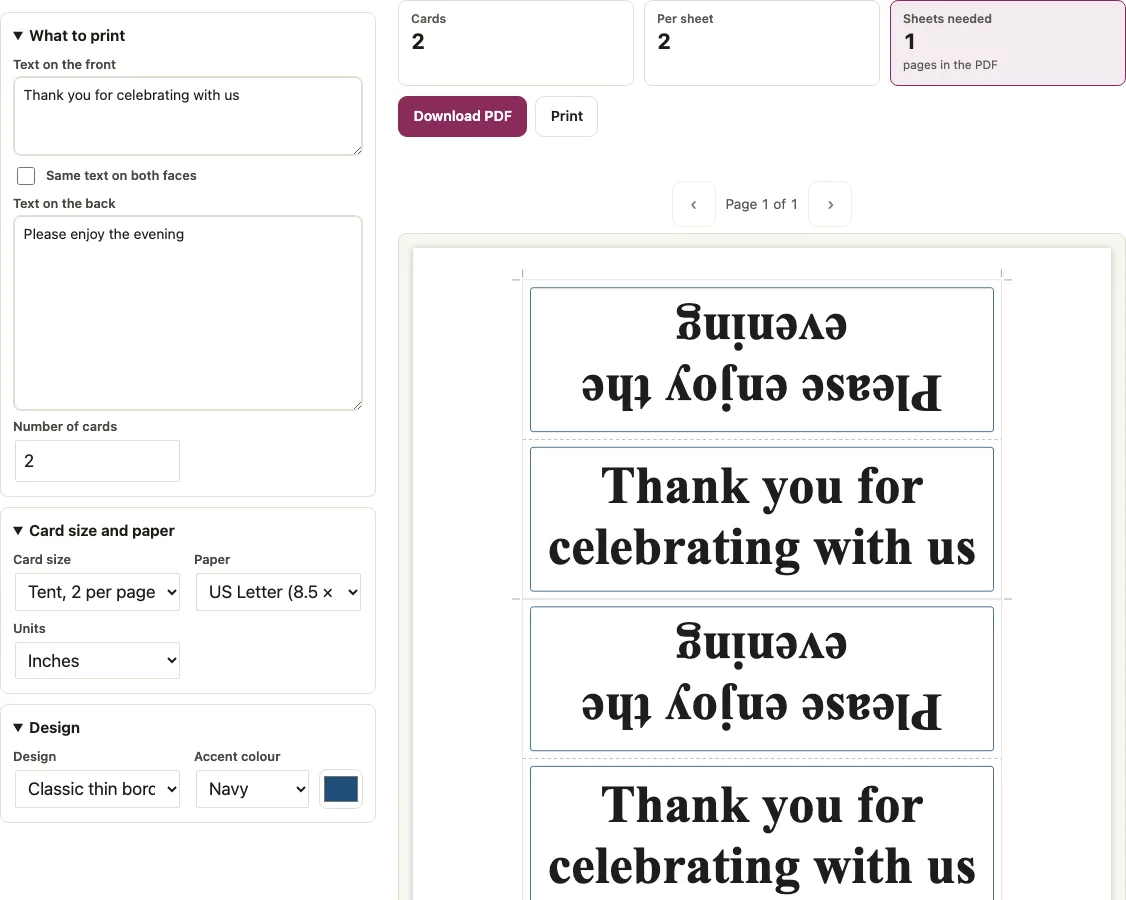
How to use the table tent card tool
- Type your message in “Text on the front”. The default is “Thank you for celebrating with us”.
- Type your message in “Text on the back”, or tick “Same text on both faces” to repeat the front text. The default back text is “Please enjoy the evening”.
- Choose a “Card size”: Tent, 2 per page (flat 7.5 x 5 in) or Tent, 4 per page (flat 4 x 5 in).
- Choose “Paper”: US Letter or A4.
- Set “Number of cards” from 1 to 500. The default is 2.
- Pick a “Design” and an “Accent colour”, or enter a custom colour.
- Click “Download PDF” or “Print”, cut along the light outlines, and fold on the dashed line.
Print at Actual size / 100 percent, not Fit to page, so the folds land where the dashed line is. Every copy on the sheet repeats the same front and back text, so the tool does not take a list of names. Type a line break in either box to put words on separate lines; the text is wrapped and sized to fit the face, so a short word such as “Reserved” prints much larger than a sentence. The “Print” button sends the PDF to your printer, and “Download PDF” saves it as seatlark-table-tents.pdf.
What are table tent cards?
A table tent card is a card folded in half that stands on a table with a message on each face. Here each tent is printed as one flat card: the lower half becomes the front face and the upper half the back face, so one fold gives a freestanding tent.
What size should a table tent card be?
The tool offers two sizes. A 2-up card is 7.5 x 5 in flat and stands with 7.5 x 2.5 in faces. A 4-up card is 4 x 5 in flat and stands with 4 x 2.5 in faces. On Letter, 2 per page gives wider faces and 4 per page gives twice as many cards on each sheet.
| Layout | Flat size | Face size when standing | Cards per US Letter sheet | Cards per A4 sheet |
|---|---|---|---|---|
| Tent, 2 per page | 7.5 x 5 in | 7.5 x 2.5 in | 2 | 2 |
| Tent, 4 per page | 4 x 5 in | 4 x 2.5 in | 4 | 2 |
A4 fits only two 4-up cards. At 0.25 in margins, the usable width is 559.28 pt, and two 4 in cards need 576 pt. On Letter the 4-up cards sit close to the paper edge, so the tool shows a note: many printers cannot print closer than 0.25 in to the edge, and the outer cut line may be lost.
How a table tent folds
The sheet folds along the dashed line through its middle. The lower half forms the front face. The upper half is the back face, turned 180 degrees about its own centre, so it reads upright once folded. Two different messages therefore fit on one sheet without either one appearing upside down.
How do you fold a table tent?
Cut the card out along the light outlines, fold it along the dashed line through the middle, and stand it up with the fold at the top. The front face is the lower half of the flat card and the back face is the upper half.
| Wording | Layout | Type size | Lines |
|---|---|---|---|
| Reserved | 2 per page | 68.6 pt | 1 |
| Reserved | 4 per page | 62.4 pt | 1 |
| Thank you for celebrating with us | 2 per page | 59.6 pt | 2 |
| Thank you for celebrating with us | 4 per page | 39.7 pt | 3 |
| Please take one | 4 per page | 59.6 pt | 2 |
The text wraps and shrinks to fit the face. The smallest size is 6 pt; text that still does not fit is cut and a note says so.
Short answers to common questions
Can I design the front and back differently?
Yes. Enter different wording in “Text on the back” and leave “Same text on both faces” unticked. Each face keeps its own message, so guests can read a different line from each side.
Can I print my table tent on my own printer?
Yes. Choose “Paper” as US Letter or A4 to match the paper in your printer, then print the sheet at that paper size. The cut lines, fold line and tick marks are printed on the sheet, so you can use them directly.
Can I add a QR code to a table tent?
No. QR codes are not available on table tents. They are available only on the name badge page, so use the name badge template if you need one.
Are table tents printed on one or both sides?
Both faces come from the same sheet. The front and back sit on separate halves of one sheet, and folding it along the middle creates a double-sided display.
How many copies can I make?
Set “Number of cards” from 1 to 500. If you request 501 copies, the tool makes 500.
How many sheets do I need for my copies?
On US Letter, 10 copies need 5 sheets in 2-up or 3 sheets in 4-up, and 100 copies need 50 sheets in 2-up or 25 in 4-up. On A4 both layouts give two cards per sheet.
Does each card get a different name?
No. Every copy repeats the same front and back text, so the tool makes identical tents. For a different guest name on each tent, use the wedding place cards page.
What happens if my text is too long?
The text wraps and shrinks to fit the face down to 6 pt. Text that still does not fit is cut, and a note shows on the page.
Related tools
- Wedding place cards: use for tent cards with a different guest name on each one.
- Wedding table numbers: use for numbered tents, one per table.
- Escort cards: use for flat cards that send guests to a table.
- Name badge template: use for conference badges instead of desk tents.
- Name tag template: use for name tag stickers.
- Wedding seating chart sign: use for a poster sign at the entrance.
- Wedding seating chart maker: use to plan which tables need a tent.
- Conference room layout: use to plan a meeting room layout where desk tents are used.