
Table Seating Chart Maker
A table seating chart shows who sits at each table and in which seat. This page lets you paste names, fill tables by group, evenly or in A to Z order, and print a PDF with a seating list by table. The venue has the final say on spacing and capacity.
Free · runs in your browser · nothing is uploaded
Recent
Your last 10 settings, saved only in this browser. Nothing is uploaded.
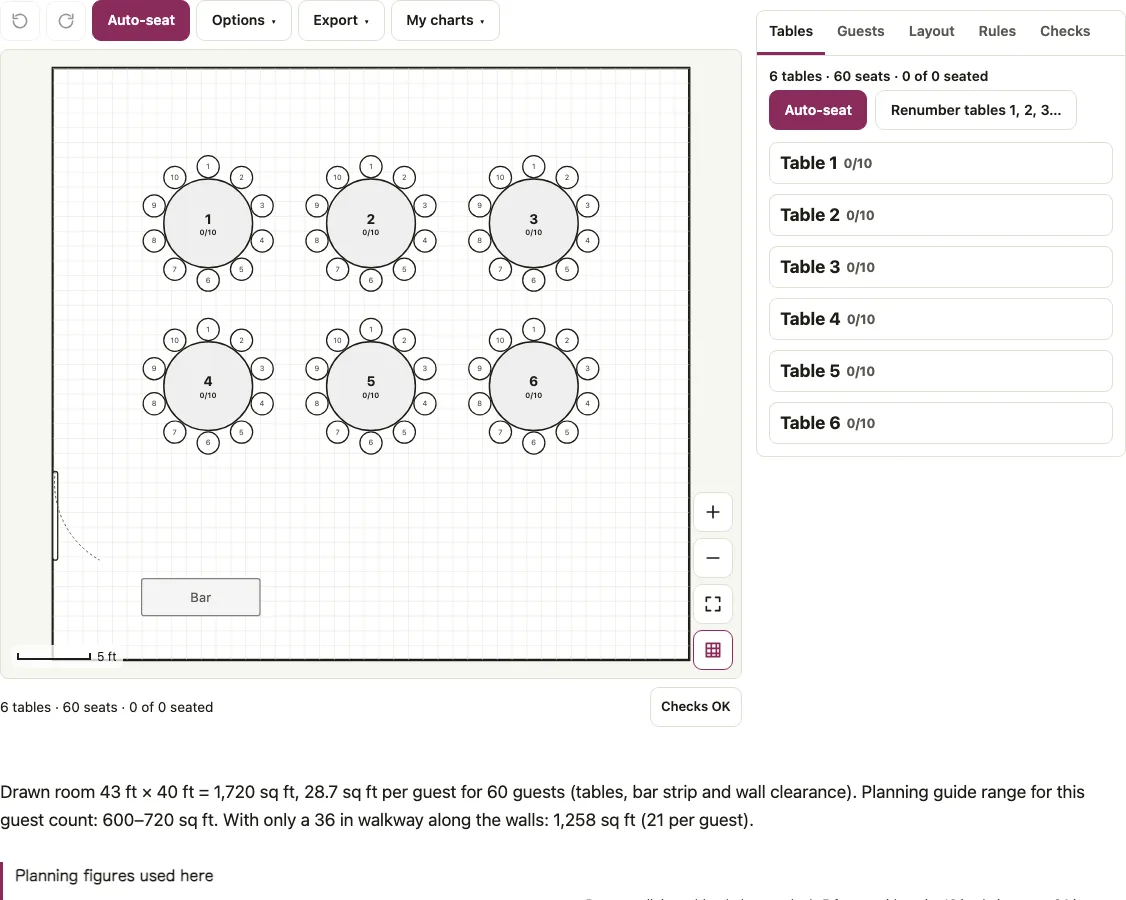
A table seating chart answers one question per table: who sits there, and in which seat. This page opens on a banquet for 60 guests, 6 round tables of 10 in a 43 x 40 ft room, and lists every table with its seat numbers in the Tables tab. Paste the names, fill the tables by group, evenly or in A to Z order, and print a PDF whose second page is the seating list by table. The Layout tab doubles as a table layout generator: give it a head count, round or long tables and 8, 10 or 12 seats per table. Add a head table from the palette when you need one.
Open the table seating chart maker, paste your guest names and press Auto-seat to build the first pass.
At a glance
A table seating chart assigns each guest a table and a numbered seat. In the Tables tab, each table is a card with its seat numbers.
- The Layout tab offers 8, 10 or 12 seats per table.
- The default 60-guest room is drawn at 43 x 40 ft, which is 1,720 sq ft.
- Balanced seating keeps every table within one person of the others.
- Checks lists tables that are closer than 5 ft.
- On a round table, seat 1 is at the top and the numbers run clockwise.
Last checked:
How to use the table seating chart maker
- On the Layout tab fill in Starting layout: Guests, Layout (Round tables or Long banquet rows), Table shape, Seats per table (8, 10 or 12), then press Build this layout.
- Open Guests, paste one name per line and press Add names. A comma adds a group (“Ana Ruiz, Sales”) and a semicolon a table (“Ana Ruiz; 3”).
- Open Options, pick a Seating order and press Auto-seat. The orders are Keep groups and parties together, Balanced, A to Z by last name and Random.
- Switch to the Tables tab. Each table is a card with its seat numbers. Use Add to this table to seat someone from the list of unseated names, or drag a name onto a seat.
- For a head table use Add a table on the Layout tab and click Head table · 8.
- Open Checks and clear what it lists: overlaps, tables closer than 5 ft, people without a seat, tables with more people than seats.
- Use Export to Download PDF, Copy seating list or Download CSV. Renumber tables 1, 2, 3… on the Tables tab fixes the numbers after you add or delete a table.
When the chart has three tables or fewer their cards open by default; with more tables the cards stay folded until you open them. A locked person keeps the seat through every Auto-seat run, and the lock button appears next to a name once it has a seat.
Seat numbers at a round table
Seat 1 is at the top of a round table, and the numbers run clockwise. On a table of 8, seat 2 sits at the upper right, seat 3 at 3 o’clock, seat 5 at the bottom and seat 7 at 9 o’clock. On a rectangle, numbering is clockwise from the top-left chair. The same numbers appear on the chart, in the Tables tab and in the PDF seating list, where a line reads “1. Name”.
Seat edge is the other number to watch. A 72 in round for 10 gives 22.62 in of table edge per seat, a 60 in round for 8 gives 23.56 in and an 84 in round for 12 gives 21.99 in. All clear the 20 in “cramped” warning.
How do I arrange table seating for a list of guests?
Choose the order by what you want from each table. We tried 47 guests in ten groups on 6 tables of 10:
| Seating order | People per table |
|---|---|
| Keep groups and parties together | 10/10/9/9/9/0 (seed 1) |
| Balanced | 8/8/8/8/8/7 (seeds 1 and 2) |
| A to Z by last name | 10/10/10/10/7/0 |
| Random | 10/10/9/9/9/0 (seed 1), 9/9/10/10/9/0 (seed 2) |
The groups order prefers fewer, fuller tables, so a table can stay empty. Balanced keeps every table within one person of the others. A to Z fills tables in order and does not apply rules.
A to Z understands surnames. Twelve names on three tables of 4 landed as: Table 1 Noah Adams, Ben van der Berg, Mia Brooks, Leo Carter; Table 2 Dr. Ivy Dean, Max Evans, Eli Fox, Uma Green; Table 3 Sam Hill, Ada Ito, Ann Smith, Zoe Young. “van der Berg” sorts under B and the title “Dr.” is ignored.
How many tables does the generator draw?
| Head count | Layout | Tables | Room |
|---|---|---|---|
| 60 | Rounds of 10 | 6 | 43 x 40 ft |
| 60 | Rounds of 8 | 8 (64 seats) | 40 x 48 ft |
| 60 | Rounds of 12 | 5 | 46 x 42 ft |
| 60 | Rectangles of 10 | 6 | 55 x 33 ft |
| 100 | Rounds of 10 | 10 | 65 x 40 ft |
| 200 | Rounds of 10 | 20 | 65 x 62 ft |
| 60 | Long banquet rows | 10 of 6 seats | 42 x 25 ft |
| 100 | Long banquet rows | 17 (102 seats) | 70 x 25 ft |
For the default 60 guests the page prints the drawn room under the chart: 43 x 40 ft = 1,720 sq ft, 28.7 sq ft per guest, against a planning-guide range of 600 to 720 sq ft for the seating alone and 1,258 sq ft with only a 36 in walkway along the walls. Long rows use 72 x 30 in tables with 3 seats a side, joined in runs of at most 6 with 4 ft aisles between runs. Rooms keep 6 ft from chair backs to the walls and a cross aisle after every 6 round tables. Dining tables are checked for 5 ft between them.
How this tool works and where the numbers come from
Table sizes, seats per table and spacing follow published event table charts and set-up guides (Tripleseat, Party Rental Ltd., Oak Street Mfg.). The venue has the final say on spacing and capacity.
Sources
Short answers to common questions
How can I create a table seating chart?
Build the tables from the Starting layout, paste the guest names, choose a seating order and press Auto-seat. Then read the Tables tab, which lists each table with its seat numbers, and fix any seat by hand.
What is the easiest way to do a seating chart?
Let Auto-seat do the first pass and adjust afterwards. Balanced gives equal tables, and groups keeps friends and family together. Lock the people who are settled so a later run leaves them alone.
Is there an app for table seating?
There is nothing to install: this page runs in the browser, on a phone too. Tap a name, then tap a seat.
Can I import my guest list?
Yes. Paste names, or use Import CSV file with columns such as name, group, party, meal, rsvp, table and seat.
How do I seat people at a head table?
Add a Head table (8 seats on one side, facing the room) from the palette. Seat the people by hand and lock them: on this page Auto-seat treats a head table like any other table, so it may use free seats there. The 5 ft table check skips head tables.
Will my work be saved if I close the browser?
Every chart is saved in its own slot in this browser. The My charts menu in the toolbar renames, opens, duplicates or deletes charts, and Save plan file downloads a copy for another device.
What does the Balanced seating order do?
Balanced seating order keeps every table within one person of the others. In the page’s example, 47 guests on 6 tables of 10 split 8/8/8/8/8/7. Keep groups and parties together fills fewer, fuller tables and can leave a table empty. A to Z fills tables in order without rules.
Related tools
- Wedding seating chart: for a reception with a head table, couples and a find-your-seat list.
- Alphabetical seating chart: to print the same seating as an A to Z sign.
- Wedding table numbers: for the numbers that sit on each table.
- Table tent cards: for fold-over cards with a table name or a menu.
- Escort cards: for cards that send each guest to a table.
- Seating chart template for Excel: if the list has to live in a spreadsheet.
- Room capacity calculator: to check how many people a room can hold in a banquet setup.
- Tablecloth size calculator: to pick a cloth for the tables you just placed.
- Event floor plan maker: to add a stage, a bar or a buffet to the room.
- Seating chart maker: for a blank room with any mix of tables.