
Seating Chart Template Excel
How do I get a seating chart template Excel file? Paste or upload your guest list, set tables and seats, then download an .xlsx. The workbook has Guests, Tables and Rules sheets, and the seat counts per table are formulas. Seats are counted per table, not as positions on a floor plan.
Free · runs in your browser · nothing is uploaded
Recent
Your last 10 settings, saved only in this browser. Nothing is uploaded.
At a glance
The seating chart template for Excel on this page takes a guest list, assigns guests to tables and downloads an .xlsx file with Guests, Tables and Rules sheets. Seats are counted per table, not as positions on a floor plan.
- The tool assigns guests to 1 to 200 tables of 1 to 200 seats each.
- For small lists, up to 14 guests who can move, the tool can prove the best arrangement.
- The workbook has three sheets: Guests, Tables and Rules.
- Upload accepts .csv, .tsv, .txt, .xlsx, .xlsm and .ods files, and the file is read in your browser.
- Guests marked No are listed but never seated or counted in a table headcount.
Last checked:
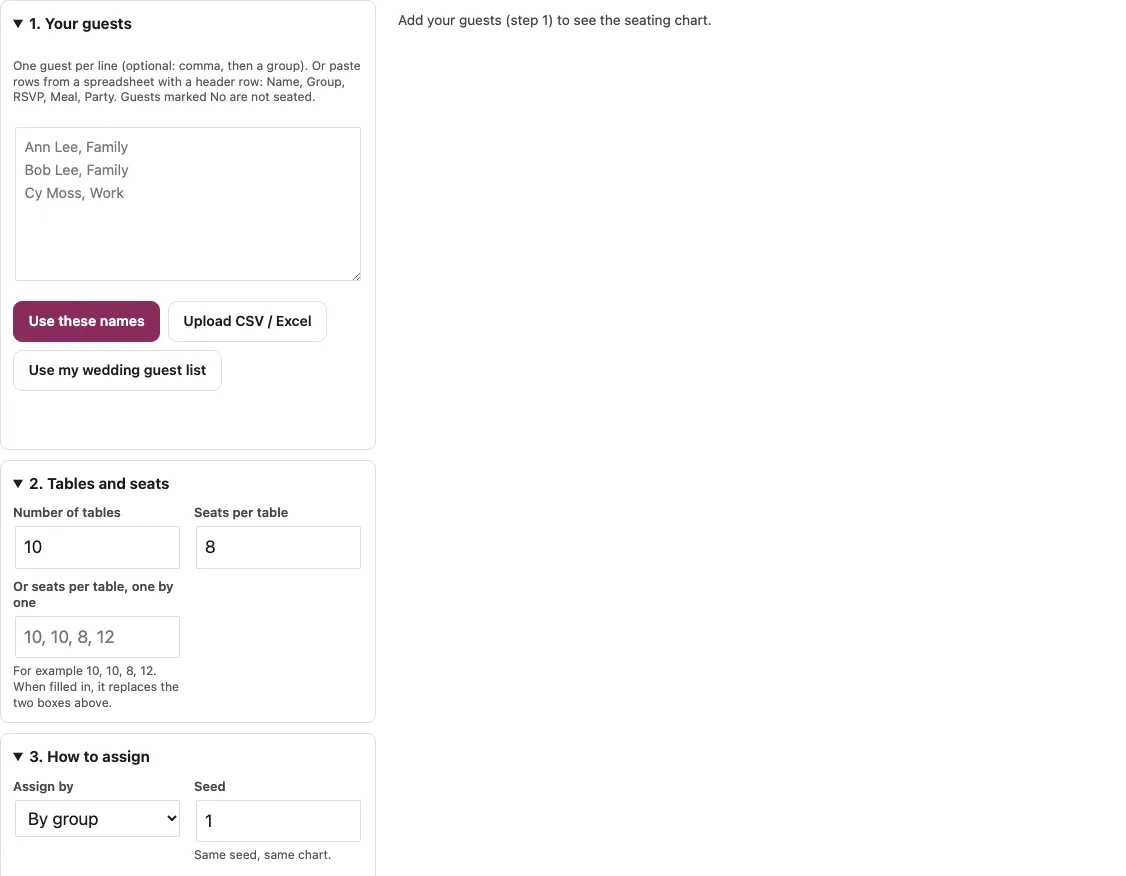
How to use the seating chart template for Excel
- In 1. Your guests, type one guest per line, with an optional comma and group, such as “Ann Lee, Family”. You can also paste rows from a spreadsheet that has a header row (Name, Group, RSVP, Meal, Party). Click Use these names, Upload CSV / Excel, or Use my wedding guest list.
- In 2. Tables and seats, set Number of tables and Seats per table. For tables of different sizes, fill in Or seats per table, one by one, for example 10, 10, 8, 12. If an entry there is not a whole number from 1 to 200, the tool says so and falls back to the number of tables times the seats per table from the two boxes above.
- In 3. How to assign, choose Assign by: By group, Balanced, A-Z or Random (seeded).
- Keep the Seed to get the same chart again, or click New random seed for a different shuffle.
- In Keep together and Keep apart, write one pair per line as Name + Name.
- Read the headline and the Headcount per table table, then the table-by-table list.
- Click Download Excel (.xlsx) or Download CSV. Copy table-by-table text copies lines such as “Table 1 (6/8): Hal Vox, Ivy Wu”, and Print prints the result.
Your settings stay in this browser, and the page address records tables, seats, mode and seed, so a bookmarked link reopens the same setup. Change one box at a time and the result below updates, which makes it easy to compare the modes on the same list.
How do I create a seating chart in Excel?
Paste the guest list, set the tables, pick a mode and download the workbook; the formulas are already in it. That replaces building a seating sheet cell by cell. After the download you can still edit the file: change a guest’s table number or RSVP on the Guests sheet and the counts on the Tables sheet update, because they are formulas.
To start from an existing spreadsheet, click Upload CSV / Excel. The first row is used as a header when it names a column (Name, or First and Last Name, plus Party, Group, RSVP, Meal, Table, Dietary or Plus one). Comma, semicolon, tab and pipe separators work, and so do .csv, .tsv, .txt, .xlsx, .xlsm and .ods files. The file is read in your browser. A Plus one column adds a seat named after the guest, such as “Ann Lee +1”. RSVP words such as attending or accepted count as Yes, declined or regrets as No, tentative as Maybe, and pending, invited, TBD or no response as No reply.
How does each assignment mode seat guests?
By group keeps parties and groups at one table as far as seats allow. Balanced does the same but gives every table the same number of guests, within one. A-Z fills tables in order by surname. Random shuffles with your seed. The example is 20 guests (7 Family, 6 Work, 7 Friends, all Yes) at 3 tables of 8 seats, seed 1.
| Mode | Guests at tables 1 / 2 / 3 | Notes |
|---|---|---|
| By group | 6 / 7 / 7 | Work at table 1, Friends at table 2, Family at table 3; 4 seats free |
| Balanced | 7 / 7 / 6 | Every table within one guest of the others |
| A-Z | 8 / 8 / 4 | Fills tables in order; keep-together and keep-apart lines are not applied |
| Random (seeded) | varies | The same seed gives the same chart, another seed a different one |
In By group, which group lands at which table comes from the search, so another list can place groups at other tables.
How are keep-together and keep-apart rules handled?
Each pair line is a firm rule that the search tries to keep first. On the same 20 guests, Ann Lee + Hal Vox together, Bob Lee + Cleo Lee apart and Nia Oz + Oli Pak apart were all kept, giving tables of 6 / 6 / 8. A line with a name that is not in the list is ignored and reported. A rule that cannot be kept is marked “not possible”, with a count such as “1 rule could not be kept with these tables”.
There is a limit to know about. For small lists, up to 14 guests who can move, the tool can prove the best arrangement. Bigger lists such as the 20-guest example use a seeded search that reports what it could not keep, without a proof that nothing better exists.
What happens when there are too few seats?
The tool says how many guests have no seat and names them. The same 20 guests at 2 tables of 8 (16 seats) give 16 seated and 4 without a seat, and the message suggests adding seats or using more tables of your largest size. Guests marked No are listed but never seated or counted in a table headcount; Maybe and No reply guests are seated and shown in their own columns.
Download the seating chart as an XLSX file
The workbook has three sheets. Guests lists Name, Party, Group, RSVP, Meal, Table and Seat (seat numbers start at 1), seated guests first, then unseated and declined guests with an empty Table, and the word No reply where a guest has not answered. Tables lists Table, Seats, Seated, Free, Confirmed (yes), Maybe, No reply and Status, with a Total row. Seated counts the Table column of the Guests sheet with COUNTIF. Confirmed, Maybe and No reply use COUNTIFS on the table and the RSVP word, Free is Seats minus Seated and the Total row uses SUM, with no macros. An empty RSVP is written as the words No reply so the count works. Rules lists Rule, Guest A, Guest B and Result. The CSV holds the Guests sheet only. Google Sheets can import either file; the tool does not make a Google Sheets file.
Short answers to common questions
Where can I find a free template for a seating plan?
There is no blank file to fill in by hand. Paste your guests first and the tool builds the seating plan, which you download as .xlsx or CSV. For a printable blank chart in several layouts, see the seating chart template.
Is there a free tool to create a seating chart?
Yes. This page assigns guests to 1 to 200 tables of 1 to 200 seats each. It gives lists and an Excel file, not a drawn room; for a drag-and-drop floor plan use the wedding seating chart page.
How do I turn an Excel guest list into a seating chart?
Save or keep the guest list as .xlsx or .csv with a header row, click Upload CSV / Excel, set tables and seats, and pick a mode. The message “N people loaded (M declined, not seated)” confirms what was read.
Can I seat the same guests again with a different arrangement?
Yes. Change Assign by, or click New random seed. Using the same seed again returns the same chart.
Does the Excel file use macros?
No. It uses plain cells plus COUNTIF, COUNTIFS and SUM. The counts on the Tables sheet recalculate if you edit the Table or RSVP column of the Guests sheet.
Can I use my wedding guest list here?
Yes. Click Use my wedding guest list to load the list saved on the wedding guest list template page. Declined guests are skipped.
How many tables and seats can I set in a seating chart template Excel?
Set the number of tables and seats per table, from 1 to 200 each. For tables of different sizes, enter seat counts one by one, such as 10, 10, 8, 12. If an entry is not a whole number from 1 to 200, the tool says so and uses tables times seats from the two boxes instead.
What happens if my guests do not fit in the seating chart?
The tool says how many guests have no seat and names them. For example, 20 guests at 2 tables of 8 seats (16 seats) gave 16 seated and 4 without a seat. The message suggests adding seats or using more tables of your largest size. Guests marked No are listed but not seated.
Related tools
Use this page for the numbers, then move to drawings and printed cards.
- Wedding guest list template: when the guest list is not built yet and you want to track RSVPs first.
- Wedding seating chart: when you want guests dragged onto drawn tables.
- Wedding seating chart template: when you want a pre-laid-out wedding plan to print.
- Table seating chart: when you want a table-by-table list for a dinner or banquet.
- Alphabetical seating chart: when guests should find their table from an A-Z sign.
- Wedding place cards: when each guest needs a name card at their seat.
- Escort cards: when guests pick up a card showing their table.
- Wedding table numbers: when the tables need numbers.