
Name Tag Template
This name tag template turns a guest list into PDF name tags that line up with your label sheet. Type one name per line, pick a tag style and a label sheet, then download the PDF. Each print holds up to 500 tags, so print the alignment test page on plain paper first.
Free · runs in your browser · nothing is uploaded
Recent
Your last 10 settings, saved only in this browser. Nothing is uploaded.
This hello my name is template turns a guest list into printable name tags. Type one name per line, choose a “Hello, my name is” or “Name only” style, and pick a label sheet so each tag lands in its own cell. The tool exports a PDF, so you print from a PDF viewer or straight from the Print option on your own printer. Any line can also take a subtitle, a colour and a font size. The preview outlines every label before you print, and the sample list opens with four names so you can see a finished page. The layouts cover the OL5030, OL3040 and OL125 label sheets, plus a custom grid for other sheets.
Click Print alignment test page and print it at Actual size on plain paper before you load the real labels.
At a glance
A name tag template is a layout that puts each name in its own label cell so the printed tags match a label sheet. This tool builds that layout as a PDF from your guest list for the sheet you choose.
- Each print holds up to 500 tags.
- OL5030 labels measure 3.375 x 2.3125 in, with 8 per sheet.
- All three listed sheets are set for US Letter (8.5 x 11 in).
- The tool warns when a label sits closer than 0.25 in to the paper edge.
- A colour must be a hex code, and a size must be between 6 and 200.
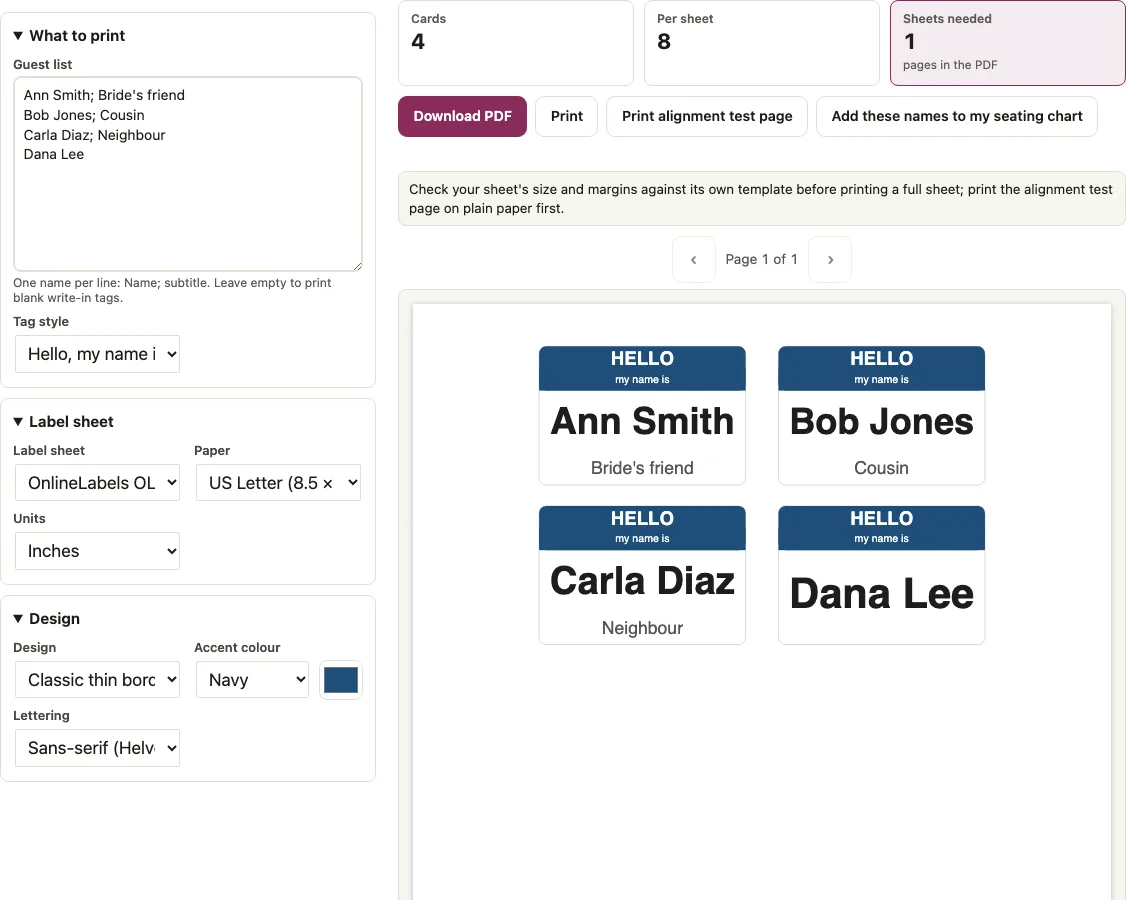
How to use the Name tag template
- Type names in the “Guest list” box, one per line. Add a subtitle after a semicolon, for example “Ann Smith; Speaker”.
- Add a colour and a size after the subtitle on the same line, for example “Bob; Cousin; #8a2f3c” or “Cara; Lead; #2e6b4f; 28”. A colour must be a hex code, and a size must be between 6 and 200.
- Open “Tag style” and choose “Hello, my name is” or “Name only”.
- Open “Lettering” and choose Helvetica (sans-serif), Times (serif) or Courier (typewriter).
- Open the “Label sheet” menu and choose OL5030, OL3040, OL125 or “Custom grid (type your sheet’s measurements)”.
- Check the preview and read any warning before you print.
- Click “Print alignment test page” and print it at Actual size on plain paper. It shows the outline and number of every label of the sheet you chose.
- Click “Download PDF” and print from your PDF viewer, or click “Print”.
The counters “Cards”, “Per sheet” and “Sheets needed” tell you how many labels you use, and a note appears if the grid runs past the page. The “Units” menu switches the custom grid between inches and millimetres. Each print holds up to 500 tags. Leave the box empty to print one sheet of blank write-in tags.
How do I line up the print with the label sheet?
Choose your sheet in the “Label sheet” menu so the tool places each tag using that sheet’s top margin, left margin and pitch. Then print at Actual size and check the result on plain paper before you load the real labels.
All three sheets are set for US Letter (8.5 x 11 in). The tool derives the right and bottom margins and the gaps from the same figures:
| Sheet | Label size (in) | Per sheet | Top / left margin (in) | Pitch across x down (in) | Right / bottom margin (in) | Gap across x down (in) |
|---|---|---|---|---|---|---|
| OL5030 | 3.375 x 2.3125 | 8 (2 x 4) | 0.594 / 0.688 | 3.75 x 2.5 | 0.69 / 0.59 | 0.38 x 0.19 |
| OL3040 | 3.375 x 2 | 8 (2 x 4) | 0.75 / 0.5 | 4.125 x 2.5 | 0.5 / 0.75 | 0.75 x 0.5 |
| OL125 | 4 x 2 | 10 (2 x 5) | 0.5 / 0.18 | 4.14 x 2 | 0.18 / 0.5 | 0.14 x 0 |
The tool warns when a label sits closer than 0.25 in to the paper edge, because many printers cannot print there. OL125 triggers this warning because its side margins are 0.18 in. OL5030 and OL3040 do not.
If your sheet is not listed, choose “Custom grid (type your sheet’s measurements)” and fill in Columns, Rows, Label width, Label height, Top margin, Left margin, Column pitch and Row pitch. Column pitch runs from left edge to left edge, and row pitch from top edge to top edge. Units switch between inches and millimetres. The custom grid reports columns or rows that run past the page, labels that overlap, negative margins, margins under 0.25 in, and an empty grid. The defaults match OL5030, so you can change one measurement at a time.
Can I use an Avery label sheet?
There is no Avery-numbered preset. Avery’s page for 5395 lists 2-1/3 x 3-3/8 in labels, 8 per sheet, and does not print the margins or the pitch that a grid needs, so this tool does not guess them. Take the measurements from the template for your own sheet and type them into the custom grid, then run the test page to check them.
Print a test page first
Click “Print alignment test page” to get a PDF that tests both scale and label positions. It prints the outline and number of every label of the sheet you chose (rounded outlines), a grid line every 1 in, a thick bar exactly 1 in long with tick marks, and a rectangle 1 in inside every edge. Print it at Actual size or 100 percent, not Fit to page, on plain paper. Hold it against the real label sheet to the light: every numbered outline should sit on a label. Then hold a ruler to the bar, which must measure 1 in (25.4 mm). If the outlines are off, check the sheet’s measurements or the print scale and turn off page scaling in the print dialog. If you pick A4 for one of the three listed sheets, the PDF is still US Letter and the tool says so.
Short answers to common questions
How do I print out a name tag?
Click “Download PDF” and open the file in your PDF viewer, then print it at Actual size. You can also click “Print” to send the layout to your printer. Run the alignment test on plain paper first, and print the real labels once the outlines sit on the labels and the bar measures 1 in.
How do I create my own name tag?
Type each name on its own line in the “Guest list” box, then choose a “Tag style” and a “Lettering” font. Add a subtitle, colour or size after semicolons on any line that needs them. Check the preview outlines before you print the sheet.
What should I print my name tags on?
Use a label sheet that matches one of the three in the “Label sheet” menu, or a sheet you describe in the custom grid: OL5030 (3.375 x 2.3125 in, eight per sheet), OL3040 (3.375 x 2 in, eight per sheet) or OL125 (4 x 2 in, ten per sheet). If your sheet is different, use the custom grid with its measurements. Plain paper is only for the test page.
Is there a template for name tags in Word?
This tool does not create Word files, so there is no Word template to download. It exports a PDF that is already laid out for the label sheet you choose. You can print that PDF without setting up a document in another program.
Why does the tool warn about my margins?
The tool warns when a label sits closer than 0.25 in to the paper edge, since many printers cannot print that close. OL125 triggers the warning because its side margins are 0.18 in. Choose a different sheet, or adjust the margins in the custom grid to clear it.
How many sheets do I need for my list?
Each print holds up to 500 tags. For 30 names you need 4 sheets on OL5030, 4 on OL3040 and 3 on OL125. For 100 names you need 13, 13 and 10 sheets on the same three sheets.
How big does a long name print?
On OL5030, “Ann Smith” prints at 44.1 pt. A long name such as “Maximilian Alexander Vandenberghe” shrinks to 20.4 pt and wraps to two lines at most. If you set a size on the line, such as 40, the tool uses that size as given.
Does the tool have Avery label presets?
No. It has OL5030, OL3040 and OL125 plus a custom grid. Avery’s page for 5395 gives the label size and count but not the margins or pitch, so type the measurements from your own sheet’s template into the custom grid.
Related tools
- Name tag generator: use it when you have a long list or a CSV and want colours and sizes for each tag.
- Name badge template: use it for larger conference badges that show a company, role and QR code.
- Wedding table numbers: use it to make numbered cards for the tables.
- Wedding place cards: use it for tent place cards that show each guest’s name.
- Escort cards: use it for flat cards that tell guests which table to sit at.
- Table tent cards: use it for fold-over desk tents.
- Wedding guest list template: use it to build the guest list before you print the tags.
- Guest list template: use it for a plain party guest list to bring to the door.