
Name Tag Generator
The name tag generator turns a list of names into a printable PDF of name tags. You can paste names or load a CSV file, and set a subtitle, colour and point size for each tag. The tool makes up to 500 tags per list, and names beyond 500 are left out.
Free · runs in your browser · nothing is uploaded
Recent
Your last 10 settings, saved only in this browser. Nothing is uploaded.
The name tag generator makes printable name tags from a list of names. Type one tag per line in the Guest list box, or import a CSV file, and the tool lays the tags out on label sheets and prints them as a PDF. Each line can carry a name, an optional subtitle such as a company or role, a hex colour and a point size. You can pick one of three lettering styles and one of two tag styles, and choose a label sheet, with OL3040 as the default. Below you find the input format, how a CSV maps to a tag, and the sheet counts.
Paste your list into the tool, then print the alignment test page on plain paper before you print the full PDF.
At a glance
The name tag generator makes printable name tags from a list of names. It lays the tags out on label sheets and prints them as a PDF.
- OL3040 is the default label sheet, and it holds 8 tags per sheet at 3.375 x 2 in.
- Names beyond 500 are left out of the output.
- A size added to a line can be from 6 to 200, and invalid sizes are ignored.
- A CSV cannot set colour or size, so you add those in the Guest list box after importing.
- The alignment test page should be printed on plain paper at Actual size / 100 percent before you print the full sheet.
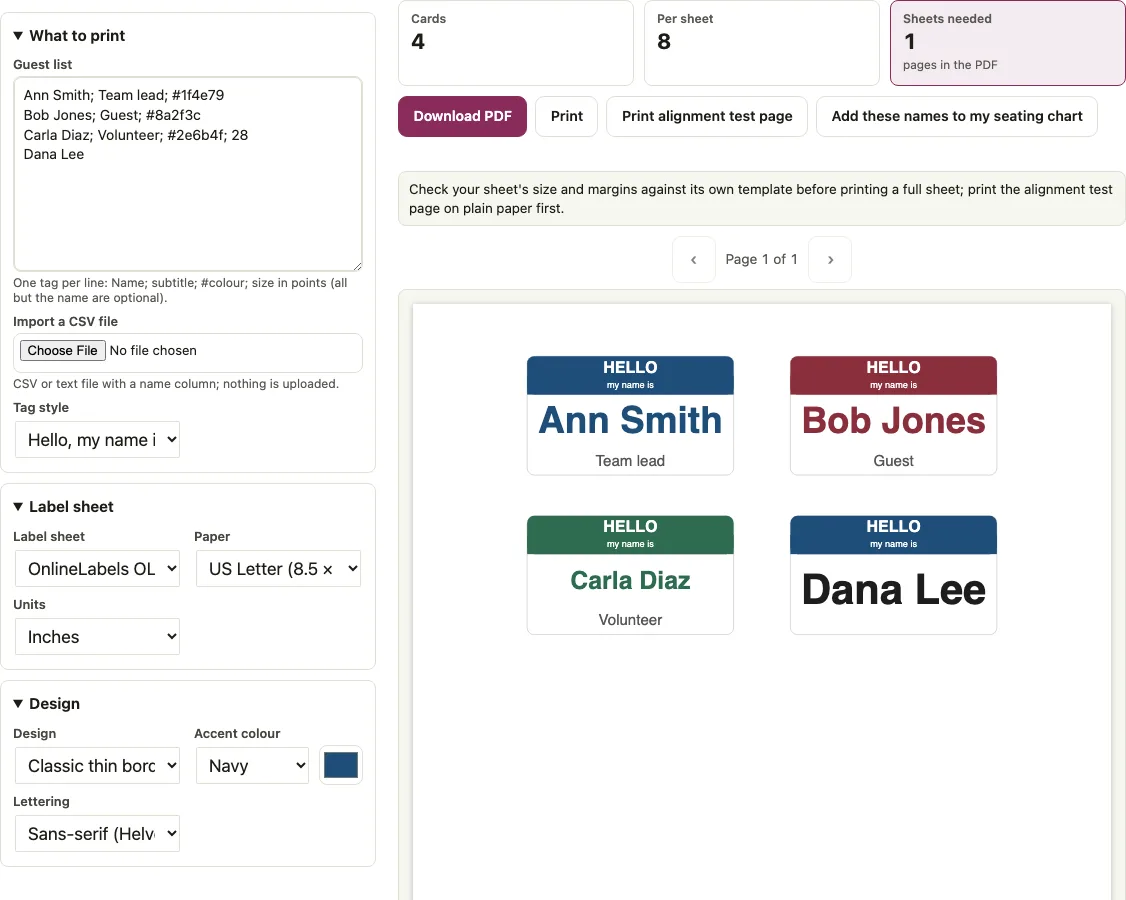
How to use the Name tag generator
- Type one tag per line in the “Guest list” box, using the pattern Name; subtitle; #colour; size. Only the name is required. For example, “Ann Smith; Team lead; #1f4e79” gives a blue tag with a subtitle.
- Or click “Import a CSV file” and choose a .csv or .txt file. Headers such as name, or first and last name, are recognised, and a group or company column becomes the subtitle.
- Open “Tag style” and pick “Hello, my name is” for a colour band with HELLO across the top (the band sits about 1/16 in inside the label edge, so normal printer drift does not run it off the label), or “Name only” for the name alone.
- If you chose “Name only”, open the “Design” menu and pick a border or ornament: Classic thin border, Modern colour band, Double frame with corners, Botanical leaf, or Monogram circle.
- Open the “Lettering” menu and choose Sans-serif (Helvetica), Serif (Times), or Typewriter (Courier).
- Select your label sheet. OL3040 is the default, and OL5030 and OL125 are also available.
- Click “Print alignment test page”, print it on plain paper at Actual size / 100 percent, and hold it against the label sheet: every numbered outline should sit on a label.
An empty list gives you one sheet of blank write-in tags, which is useful when you want to fill them in by hand.
Name tags from a CSV
You can make name tags from a spreadsheet by saving it as a CSV file and loading it with “Import a CSV file”.
A column named name, or a First Name and Last Name pair, becomes the tag’s name. A group or company column becomes the subtitle. A file with First Name, Last Name, and Company, where one row reads Ann, Smith, Acme, gives the line “Ann Smith; Acme”. A Name, Group, Table file gives the name and group, and the table column is not used for tags.
A CSV cannot set colour or size, so add those to the lines in the Guest list box after importing. A quoted “Smith, Ann” cell is turned into “Ann Smith” on import.
How to print a name tag?
Check the alignment on plain paper first, then print the tags on your label sheet at actual size. Pick the sheet before you print, because it sets how many tags fit on each page.
- Choose a label sheet: OL3040 (3.375 x 2 in, 8 per sheet), OL5030 (3.375 x 2.3125 in, 8 per sheet), or OL125 (4 x 2 in, 10 per sheet).
- Click “Print alignment test page” and print it on plain paper at Actual size / 100 percent.
- Hold the test page against your label sheet to the light. It prints the outline and number of every label of the sheet, so the outlines should sit on the labels, and the 1 in bar should measure 1 in.
- Print the full PDF on the label sheet at Actual size / 100 percent. Label sheets print no cut marks, so trim along the label edges.
Sheets needed for a list:
| Names | OL5030 | OL3040 | OL125 |
|---|---|---|---|
| 4 | 1 | 1 | 1 |
| 8 | 1 | 1 | 1 |
| 10 | 2 | 2 | 1 |
| 50 | 7 | 7 | 5 |
| 100 | 13 | 13 | 10 |
| 250 | 32 | 32 | 25 |
| 500 | 63 | 63 | 50 |
Which lettering fits on a tag?
Lettering changes how large a name can print. On OL3040, “Ann Smith” prints at 41.7 pt in Helvetica, 45 pt in Times and 38.6 pt in Courier. The long name “Maximilian Alexander Vandenberghe” prints at 20.4, 21.8 and 17.4 pt. A size typed on the line overrides the fitted size, so a tag with “;40” prints its name at 40 pt.
Short answers to common questions
How do I create a custom name tag?
Type each name in the “Guest list” box, one per line, and add a subtitle, colour, or size after the semicolons if you want them. Then choose a tag style, a lettering style, and a label sheet, and print the PDF.
How to make a name tag for school?
Put each name on its own line in the “Guest list” box and use the subtitle for a class or group, such as “Maya Brown; Class 4B”. If you already have a roster in a spreadsheet, import it as a CSV with a Name and Group column.
What if I need to resize my name tags?
Add a size from 6 to 200 as the last item of a line, such as “Carla Diaz; Volunteer; #2e6b4f; 28”. Without a size, “Ann Smith” prints at 41.7 pt on OL3040, and a long name drops to 20.4 pt. Invalid sizes are ignored, and changing the label sheet changes the tag dimensions.
Should name tags have a title?
That is up to you. The line format has an optional subtitle after the name, so a role or title such as “Team lead” can sit under the name, and a line with only a name prints the name alone.
What happens if my list is empty?
The tool prints one sheet of blank write-in tags that you can fill in by hand.
What happens if my list has more than 500 names?
Names beyond 500 are left out. A list of 501 names makes 500 tags, and a note tells you that 1 was left out and suggests splitting the list.
Why does an emoji look different on my tag?
Emoji and other characters outside the standard PDF fonts are drawn as images. They print sharp but cannot be selected as text, and a note counts those lines.
Why do I see a spacing warning with OL125?
The OL125 labels sit 0.18 in from the paper edge, closer than 0.25 in, which triggers a warning. Print the alignment test page first to check the fit before you print the full sheet.
Related tools
- Name tag template: use it for the label sheet figures and the alignment test page.
- Name badge template: use it for larger badges that show a company, role, and QR code.
- Wedding place cards: use it for tent place cards at a dinner.
- Table tent cards: use it for desk tents.
- Wedding guest list template: use it to build the attendee list before making tags.
- Guest list template: use it for a printable party guest list.
- Seating chart template for Excel: use it to prepare names and groups in a spreadsheet-style sheet.
- Classroom seating chart: use it for a classroom roster with seats.