
Name Badge Template
A name badge template turns a pasted guest list into printable conference badges. Each line becomes one card with a name and, if you add them, a company, a role and a QR code, in 4 x 3 in landscape or 3 x 4 in portrait. The cards are laid out on Letter or A4 paper, and one print can hold up to 500 badges.
Free · runs in your browser · nothing is uploaded
Recent
Your last 10 settings, saved only in this browser. Nothing is uploaded.
The Name Badge Template turns a pasted guest list into printable conference badges. Each line becomes one card with a name and, if you add them, a company, a role and a QR code, in 4 x 3 in landscape or 3 x 4 in portrait. The cards are laid out on Letter or A4 paper in 4 x 3 in or 3 x 4 in sizes. You choose the card size, one of five designs and an accent colour, then print the sheets. The QR codes are generated by the tool itself. The “Card size” menu also lists three OnlineLabels sheets for sticker badges (OL5030 and OL3040 with 8 labels, OL125 with 10) and a custom grid; the name tag template page has their margins and pitch.
Paste your guest list into the tool and print the alignment test page on plain paper before you print the full set.
At a glance
A name badge template turns a pasted guest list into printable conference badges, one card per line. The badges come in 4 x 3 in landscape or 3 x 4 in portrait, laid out on Letter or A4 sheets.
- The tool makes badges in two sizes: 4 x 3 in (landscape) and 3 x 4 in (portrait).
- One print can hold up to 500 badges.
- On Letter, a 4 x 3 badge gives 6 per sheet and a 3 x 4 badge gives 4.
- The QR code is 0.93 in square on a 4 x 3 badge and 0.91 in on a 3 x 4 badge.
- QR text over 120 characters is left out, and a note says how many badges lost their code.
Last checked:
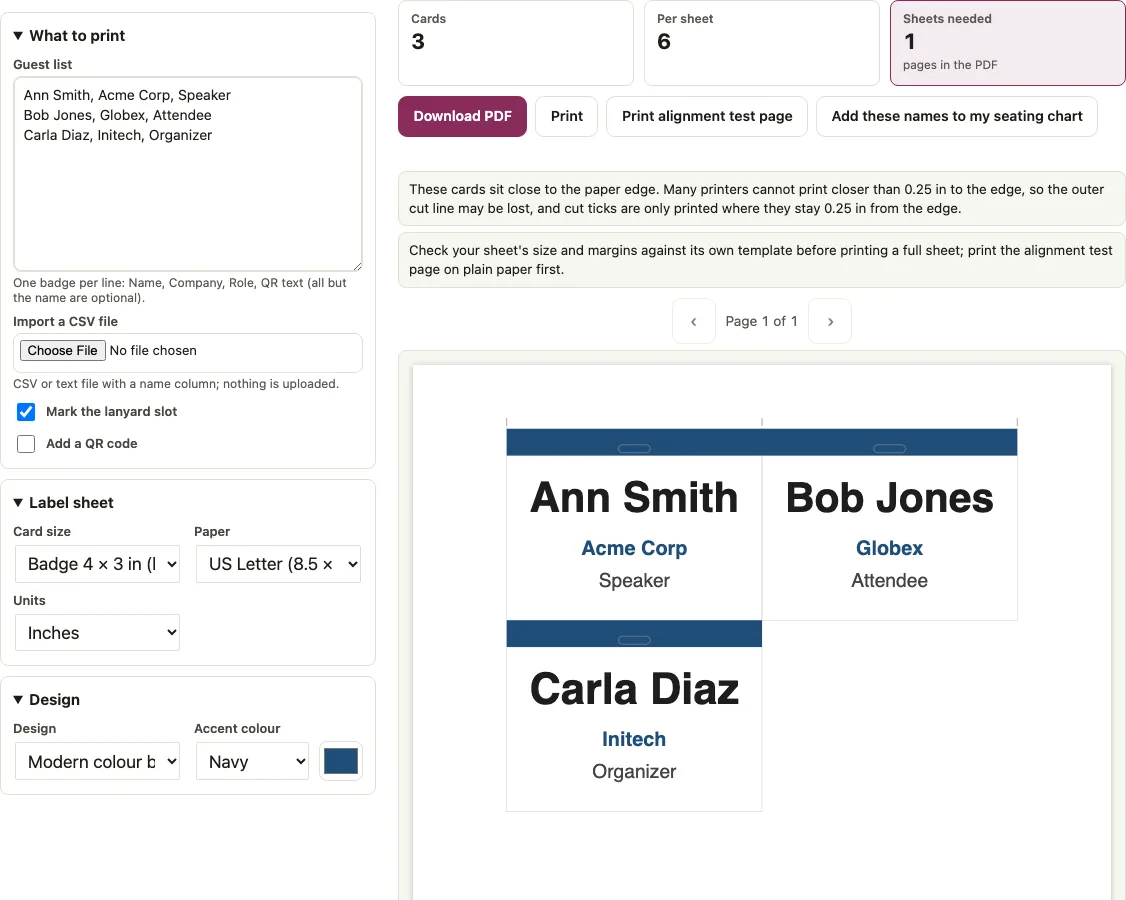
How to use the Name Badge Template
- Type or paste your guests into the “Guest list” box, one badge per line. Separate the columns with commas or tabs in this order: Name, Company, Role, QR text. Only the name is required.
- To load a file instead, click “Import a CSV file” and choose a .csv or .txt file. The header row is recognised for name (or first and last name), group or company, and note. A note column goes to Role. QR text cannot come from the CSV, so add it as a fourth column in the box.
- Open the “Card size” menu and pick Badge 4 x 3 in (landscape) or Badge 3 x 4 in (portrait).
- Choose one of the five designs and an accent colour.
- Tick “Mark the lanyard slot” if you want the punch guide drawn on each badge.
- Tick “Add a QR code” if your list includes QR text.
- Click “Print alignment test page” and print it on plain paper at Actual size / 100 percent before you use card stock. It prints the outline and number of every badge of the layout you chose, a 1 in grid and a 1 in bar, so it checks both scale and position.
- Print the full set. One print can hold up to 500 badges.
Lines that start with # are ignored, so you can keep notes in the list. The sample list has 3 badges, which is a good first test.
What size is a conference badge?
This tool makes card-size badges in two sizes: 4 x 3 in (landscape) and 3 x 4 in (portrait). You pick one from the “Card size” menu, and the layout, type and sheet counts all follow from that choice. If you need a different insert size, this tool does not offer it.
Names are sized to fit the box, and the company and role lines are sized separately. With the default Modern colour band design and the lanyard slot on, a name like “Ann Smith” prints at 47.3 pt on a 4 x 3 badge, and the company “Acme Corp” prints at 22.5 pt. On a 3 x 4 badge the name is 44.9 pt, and the company is 30.8 pt. Names that are too long are shrunk, and they use two lines at most.
How does the QR code on a badge work?
The QR text is the fourth column of a line, for example a link or an email address. The code is drawn at the lower right of the badge: 29 x 29 modules for “https://example.com/ann-smith”, printed 0.93 in square on a 4 x 3 badge and 0.91 in on a 3 x 4 badge, including a 4-module quiet zone. It uses error correction level M, which is the medium level of the QR standard, and the text is stored as UTF-8, so accented letters, CJK and emoji in the text are encoded correctly. The code holds exactly the text you typed in the fourth column, nothing else, so scan a printed badge before you print the whole run. Text over 120 characters is left out, and a note says how many badges lost their code.
Badge sizes: 4x3 or 3x4
Sheet counts depend on the paper and the card size. The table shows how many sheets you need for common print runs.
| Badges | Letter, 4x3 (6 per sheet) | Letter, 3x4 (4 per sheet) | A4, 4x3 (3 per sheet) |
|---|---|---|---|
| 6 | 1 | 2 | 2 |
| 12 | 2 | 3 | 4 |
| 25 | 5 | 7 | 9 |
| 50 | 9 | 13 | 17 |
| 100 | 17 | 25 | 34 |
| 200 | 34 | 50 | 67 |
| 500 | 84 | 125 | 167 |
On A4, the 4 x 3 badge sits in a single column. The usable width at 0.25 in margins is 559.28 pt, and two 4 in badges side by side need 576 pt. A4 fits 4 of the 3 x 4 badges per sheet, so the portrait size gives more cards per page on that paper.
Short answers to common questions
What should I print name badges on?
The tool does not pick the paper for you. It lays out 4 x 3 in or 3 x 4 in cards on a Letter or A4 page, with cut outlines and tick marks, so print on whatever stock your badge holders take and run the alignment test page on plain paper first.
Can I add a QR code to a name badge?
Yes. Tick “Add a QR code” and put the link or email address in the fourth column of the line. On a 4 x 3 badge the code is 0.93 in square, and on a 3 x 4 badge it is 0.91 in, placed at the lower right. Text over 120 characters is left out, and a note tells you how many were skipped.
Can I print many badges from a list?
Yes. Paste one badge per line in the “Guest list” box or load a file with “Import a CSV file”. A single print holds up to 500 badges, and the sheet table above shows how many pages that takes.
Where does the lanyard hole go?
Tick “Mark the lanyard slot” and a 0.5 x 0.125 in rounded outline appears at the top centre of the badge. It sits 0.25 in below the top edge, which is 1.75 in from the left edge of a 4 in wide badge. The outline is only a guide for punching or cutting. The tool does not cut anything.
How many badges fit on a page?
On Letter, a 4 x 3 badge gives 6 per sheet and a 3 x 4 badge gives 4. On A4, a 4 x 3 badge gives 3 per sheet and a 3 x 4 badge gives 4. The full set of sheet counts is in the table above.
How do I check the layout before printing everything?
Click “Print alignment test page” and print it on plain paper. Hold it against your card stock or label sheet to check position, and check the 1 in bar to check scale, before you print the full run.
What size is a conference badge?
This tool makes badges in two sizes: 4 x 3 in landscape and 3 x 4 in portrait. You pick one from the Card size menu, and the layout, type and sheet counts all follow from that choice.
Can I import a CSV file of guests?
Click Import a CSV file and choose a .csv or .txt file. The header row is recognised for name (or first and last name), group or company, and note. A note column goes to Role. QR text cannot come from the CSV, so add it as a fourth column in the box.
Related tools
- Name tag template for sticker name tags on label sheets, with a test page.
- Name tag generator for bulk tags where each person gets their own colours.
- Table tent cards for desk tents with a name on both faces.
- Wedding place cards for place cards at a dinner.
- Wedding table numbers for numbered table cards.
- Conference room layout to plan the room for your event.
- Guest list template for a guest list to bring to registration.
- Wedding seating chart maker to seat your attendees at tables.