
Escort Cards
What are escort cards? Cards that tell each guest which table to sit at, which this tool prints flat from one pasted list. Choose 3.5 x 2 in or 3 x 5 in, sort A to Z by surname, by table or as typed, then download the PDF or click Print. The cards are flat and single-sided, and the tool does not make place cards for a specific seat.
Free · runs in your browser · nothing is uploaded
Recent
Your last 10 settings, saved only in this browser. Nothing is uploaded.
This escort card tool turns one guest list into printable escort cards. Paste the list with one guest per line, such as Ann Smith; 4, and each card prints the guest’s name with its table label. You choose a flat card size, either 3.5 x 2 in or 3 x 5 in, then sort the cards A to Z by surname, by table, or as typed. The tool gives you a PDF and a Print button, with cut outlines and tick marks so the cards are easy to trim. It works for escort cards, which point guests to their table, not for place cards that show a specific seat.
Paste your guest list into the escort cards tool and download your cards.
At a glance
An escort card tells each guest which table to sit at, while a place card shows the exact seat at that table.
- The 3.5 x 2 in size fits 10 per sheet in two columns of five, and the 3 x 5 in size fits 4 per sheet in a 2 x 2 grid, on both Letter and A4.
- Each print can hold up to 500 cards.
- Write the name as "Ann Smith", not "Smith, Ann", because a comma after the name is read as a separator.
- For "Ann Smith" with "Table 12", the name is 39.8 pt and the table label is 29.8 pt on the 3.5 x 2 in card.
- Cut ticks are printed only where they stay 0.25 in from the paper edge.
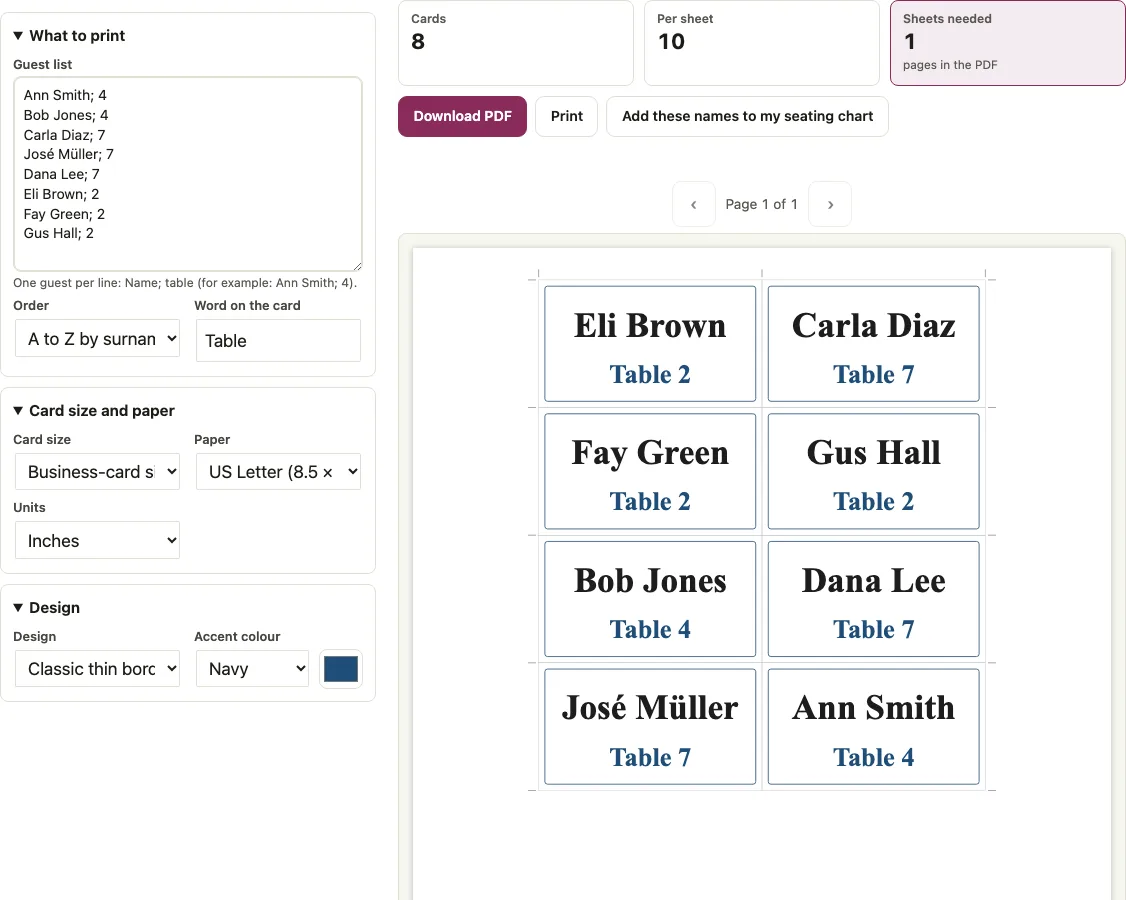
How to use the Escort Cards tool
- Click in the “Guest list” box and type one guest per line as Name; table. For example, write Ann Smith; 4. The table can be a number or a word such as Rose.
- Write the name as “Ann Smith”, not “Smith, Ann”. A comma after the name is read as a separator, and a hint appears under the tool if a line looks like “Smith, Ann”. Lines that start with # are ignored.
- If a seating chart is saved in this browser, the box is filled from it and the table labels come from the chart.
- Under “Card size”, choose “Business-card size 3.5 x 2 in” or “Index-card size 3 x 5 in”.
- In “Word on the card”, the default is Table. Type another word there, or leave it empty so only the name and number print.
- Open the “Order” menu and choose “A to Z by surname”, “By table”, or “As typed”.
- Pick one of the five designs, an accent colour or a custom colour, then choose Letter or A4 and inches or millimetres.
- Click “Download PDF” or “Print”.
- Print at Actual size / 100 percent so the cards match the cut outlines.
Each print can hold up to 500 cards. Cut along the light grey outlines; cut ticks are printed only where they stay 0.25 in from the paper edge. A note warns about long names that shrink below 12 pt.
What is an escort card?
An escort card tells each guest which table to sit at, and a place card shows the exact seat at that table. This tool prints each escort card as a flat, single-sided card with the guest’s name and the table label, so guests can find their own card and read the table from it. “Use the N guests from my seating chart” reloads the chart’s guests, and “Add these names to my seating chart” adds missing names without changing existing guests. Characters outside the standard PDF fonts print as images, so they cannot be selected in the PDF.
Escort card or place card?
An escort card names the table, while a place card names the exact seat at that table. Here each card shows the name and the table label, and a guest without a table prints the name only. For a card at the seat, use the wedding place cards page, which makes tent-fold cards from the same kind of list.
What size should escort cards be?
Choose 3.5 x 2 in (business-card size) or 3 x 5 in (index-card size). Both sizes are flat and single-sided, and this tool does not fold cards. The table below shows how many Letter or A4 sheets each guest count needs. A4 needs the same number of sheets as Letter.
| Guests | 3.5 x 2 in sheets | 3 x 5 in sheets |
|---|---|---|
| 8 | 1 | 2 |
| 20 | 2 | 5 |
| 50 | 5 | 13 |
| 80 | 8 | 20 |
| 120 | 12 | 30 |
| 150 | 15 | 38 |
| 200 | 20 | 50 |
How do you lay out escort cards?
The tool lays out the cards for you. The 3.5 x 2 in size fits 10 per sheet in two columns of five, and the 3 x 5 in size fits 4 per sheet in a 2 x 2 grid, on both Letter and A4. Pick the size first, because it sets how many sheets your list needs.
How do you sort escort cards?
The “Order” menu sorts the cards in one of three ways. The table below shows the result for a test list of Zed Young; 2, Ann Smith; 10, Bob Adams; 1, Cy van der Berg; 2, and Dr. Eva Cole; 9.
| Order option | Resulting order |
|---|---|
| A to Z by surname | Bob Adams, Cy van der Berg, Dr. Eva Cole, Ann Smith, Zed Young |
| By table | Bob Adams (1), Cy van der Berg (2), Zed Young (2), Dr. Eva Cole (9), Ann Smith (10) |
| As typed | The order you typed the guests |
The last word of a name is the surname. Lower-case particles stay in front of it, so van der Berg sorts under B. Honorifics such as Dr. and suffixes such as Jr. are ignored, and accents are folded.
Short answers to common questions
What makes flat escort cards different from folded escort cards?
A flat escort card is printed on one face and not folded; a folded one is folded in half. This tool makes only flat, single-sided cards, so folded escort cards are not available here.
Can I sort escort cards by table?
Yes. Choose “By table” in the “Order” menu. Table numbers sort in natural order, so table 2 comes before table 10.
What do escort cards look like?
With the default design, the guest’s name prints large with the table label under it. For “Ann Smith” with “Table 12”, the name is 39.8 pt and the table label is 29.8 pt on the 3.5 x 2 in card. On the 3 x 5 in card, the name is 64.3 pt and the label is 45.6 pt.
How big are escort cards? What size are they when folded?
The sizes in “Card size” are 3.5 x 2 in and 3 x 5 in, both flat. One wedding-planning guide (zkipster.com) gives about 2.5 x 3.5 in flat and 2.5 x 1.75 in folded as typical sizes, which varies by design; this tool does not produce folded cards.
How many escort cards fit on a sheet?
The 3.5 x 2 in size fits 10 per sheet (2 columns, 5 rows) and the 3 x 5 in size fits 4 (2 columns, 2 rows), on Letter and on A4. For 50 guests that is 5 sheets or 13 sheets, and for 120 guests 12 sheets or 30.
What is the difference between escort cards and place cards?
An escort card tells each guest which table to sit at, while a place card shows the exact seat at that table. This tool prints escort cards as flat, single-sided cards with the guest’s name and the table label. It is not for place cards that show a specific seat.
How do I sort escort cards alphabetically?
Open the “Order” menu in the tool and choose “A to Z by surname”. The last word of a name is the surname, so Ann Smith sorts under S. Lower-case particles stay in front of it, so van der Berg sorts under B, and honorifics such as Dr. are ignored.
Related tools
- Wedding place cards: use these for tent cards that mark the seat once guests reach the table.
- Wedding table numbers: use these for the table number cards guests look for.
- Alphabetical seating chart: use it to replace a display of cards with one A-Z poster.
- Wedding seating chart sign: use it to list every table on one large sign.
- Wedding seating chart maker: use it to seat guests first so each card has a table number.
- Wedding seating chart template: use it for a printable chart that shows the tables.
- Name tag template: use it for sticker name tags guests can wear.
- Seating chart template for Excel: use it to assign tables in a spreadsheet-style sheet.