
Bus Seating Chart
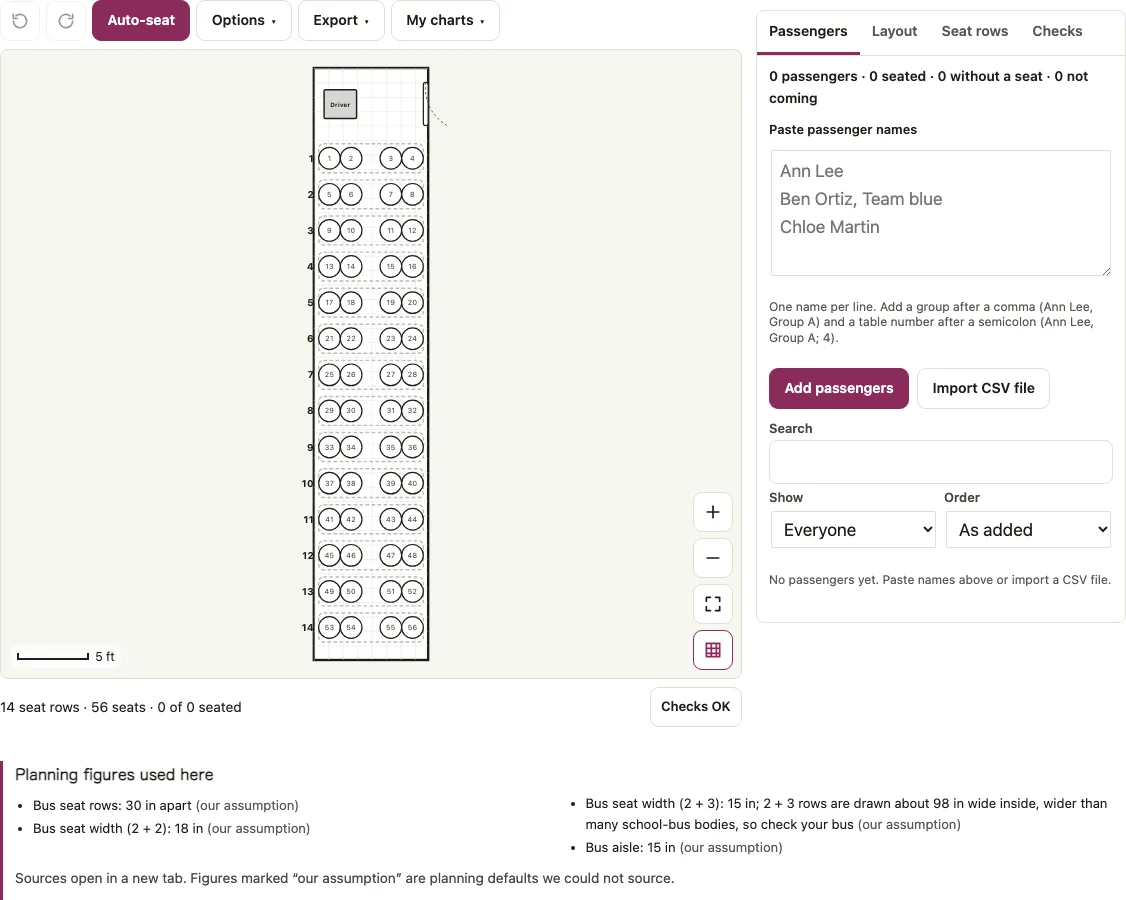
Make a bus seating chart by choosing 20 to 72 passengers and a 2 + 2 or 2 + 3 row layout. The page numbers every seat row by row from the first row behind the driver, seats riders from a pasted list and prints the chart. The chart has exactly one seat per passenger, so the last row can be shorter.
Free · runs in your browser · nothing is uploaded
Recent
Your last 10 settings, saved only in this browser. Nothing is uploaded.
Make a bus seating chart by choosing how many passengers ride and whether the rows are 2+2 or 2+3. The page draws the bus with the driver at the front, numbers every seat from the first row, and lets you drop riders onto seats from a pasted list or let Auto-seat do it. The count runs from 20 to 72 passengers, and the chart has exactly that many seats, so the last row can be shorter. The aisle stays clear to the back of the bus. Print it as a school bus seating chart, or print it blank as a bus seating template to fill in by hand. The rider list can be saved as CSV.
Set your passenger count and seat layout in the bus seating chart tool, then paste your riders and press Auto-seat.
At a glance
A bus seating chart is a numbered drawing of bus seats, numbered row by row from the first row behind the driver, with each rider's name placed on a seat.
- Passengers can be set from 20 to 72, and a number outside that range moves to the nearest limit.
- Seats are numbered row by row, left to right in the drawing, starting with the first row behind the driver.
- The page starts with 56 passengers in 2 + 2 rows, which gives 14 rows.
- Paper sizes for export are Letter, A4 and two posters.
- Seat spacing of 30 in and widths of 18 in for 2 + 2 or 15 in for 2 + 3 are the page's own planning defaults.
- The plan is saved only in your browser, with no account and nothing uploaded.
Last checked:
How to use the bus seating chart
Open the Layout tab. Under Starting layout set Passengers (20 to 72; a number outside that range moves to the nearest limit) and Seats across: “2 + 2 (aisle in the middle)” or “2 + 3”. Press Build this layout. The page starts with 56 passengers in 2 + 2 rows.
Open the Passengers tab, paste the riders into Paste passenger names, one per line, and press Add passengers. Add a group after a comma (“Ben Ortiz, Team blue”) to seat teams together. Import CSV file reads a list from a file.
Press Auto-seat. Open Show and choose Without a seat to see anyone left over.
To move a rider, drag the name onto a seat, or tap the name and then the seat. The lock button beside a seated name keeps that rider in place when you press Auto-seat again.
Open Checks to confirm every rider has a seat before you print.
Open Export and choose Print or Download PDF. PDF puts the chart on page 1 and the seat list by row after it. Download CSV saves the riders with their row and the same seat numbers as the chart. Paper sizes are Letter, A4 and two posters.
Leave names blank (printable template) prints an empty chart for hand writing, and Save plan file keeps the plan for later.
Bus seat numbering
Seats are numbered row by row, left to right in the drawing, starting with the first row behind the driver. The driver is drawn at the front on the left and the door at the front on the right, so row 1 of a 2 + 2 bus holds seats 1 to 4.
With 56 passengers in 2 + 2 there are 14 rows. Row 1 holds seats 1 to 4, with 1 and 2 left of the aisle and 3 and 4 right of it, row 2 holds 5 to 8, and row 14 holds 53 to 56.
The chart has exactly as many seats as passengers, so the last row can be shorter. A rider left over after full rows sits in that shorter last row, and the aisle stays clear all the way to the back.
| Passengers | 2 + 2 rows | 2 + 3 rows |
|---|---|---|
| 20 | 5 | 4 |
| 36 | 9 | 8 (last row 1 seat) |
| 48 | 12 | 10 (last row 3 seats) |
| 56 | 14 | 12 (last row 1 seat) |
| 72 | 18 | 15 (last row 2 seats) |
For 41 passengers in 2 + 2 there are 11 rows, and the last one has a single seat. In 2 + 3 with 56 passengers, rows 1 to 11 hold seats 1 to 55 and row 12 holds seat 56. To show empty seats on a bigger bus, enter the bus’s full seat count and add fewer riders.
Why use a school bus seating chart?
A chart lets the driver or a teacher see at a glance who sits where, and a printed copy can be kept on the bus. This page prints the chart and a seat list by row, so one plan serves a quick check and a record.
Group names fill whole rows when the counts allow: with two groups of 12 on a 24-seat bus, Team blue filled rows 2, 3 and 5.
What are common mistakes to avoid when filling out a bus seating chart?
- Duplicate names. A name that appears twice is flagged, for example “1 name appears more than once”. Fix it before printing.
- Expecting keep-apart rules. This page has no Rules tab. A bus row counts as one table, so groups are seated row by row, and separating two riders is done by dragging them to different rows yourself.
- Expecting window or aisle choices. The tool does not pick window or aisle seats.
- Assuming safety features are drawn. Wheelchair spaces and emergency exits are not marked, and only the entrance door is drawn. Seat spacing (30 in), widths (18 in for 2 + 2, 15 in for 2 + 3) and the 15 in aisle are our own planning defaults, and 2 + 3 rows are drawn about 98 in wide inside, wider than many school-bus bodies, so check your bus.
Short answers to common questions
Who needs a school bus seating chart?
Anyone responsible for a group on a bus: a teacher leading a field trip, a coach with a team, a driver, or an organiser of a group outing. The printed chart shows each rider’s seat before the bus leaves.
How are the seats numbered?
Row by row from the front, left to right in the drawing. In 2 + 2 with 56 passengers, row 1 is seats 1 to 4 and the last row, row 14, is seats 53 to 56.
How do I seat riders from a list?
Paste the names in the Passengers tab, check the count matches the seats you need, and press Auto-seat. Drag any rider to a different seat afterwards, and lock them if you shuffle again.
Can I keep two riders apart on the bus?
By hand. There is no Rules tab on this page, so drag the two riders to seats in different rows and lock them. Auto-seat would not know to keep them apart.
Can I print the chart?
Yes. Print and Download PDF give the chart and the seat list by row, in Letter, A4 or poster sizes. An empty chart is available too.
Is my seating plan saved?
It is saved only in your browser, with no account and nothing uploaded. The same names appear on the other Seatlark seating pages in that browser.
What happens when the riders do not fill whole rows?
The chart has exactly as many seats as passengers, so the last row can be shorter. A rider left over after full rows sits in that shorter last row, and the aisle stays clear to the back. For 41 passengers in 2 + 2 there are 11 rows, and the last one has a single seat.
Related tools
- Classroom seating chart: use it for the classroom roster and desks.
- Random seating chart generator: use it to shuffle names onto any layout.
- Name tag generator: use it to make tags for a group trip.
- Table seating chart: use it for the dinner stop or banquet.
- Seating chart template: use it when you need a blank printable chart.
- Classroom layout: use it to plan the classroom floor.
- Classroom, meeting and random seating tools: use the group page to compare all the seating tools for a class or a meeting.