
Alphabetical Seating Chart
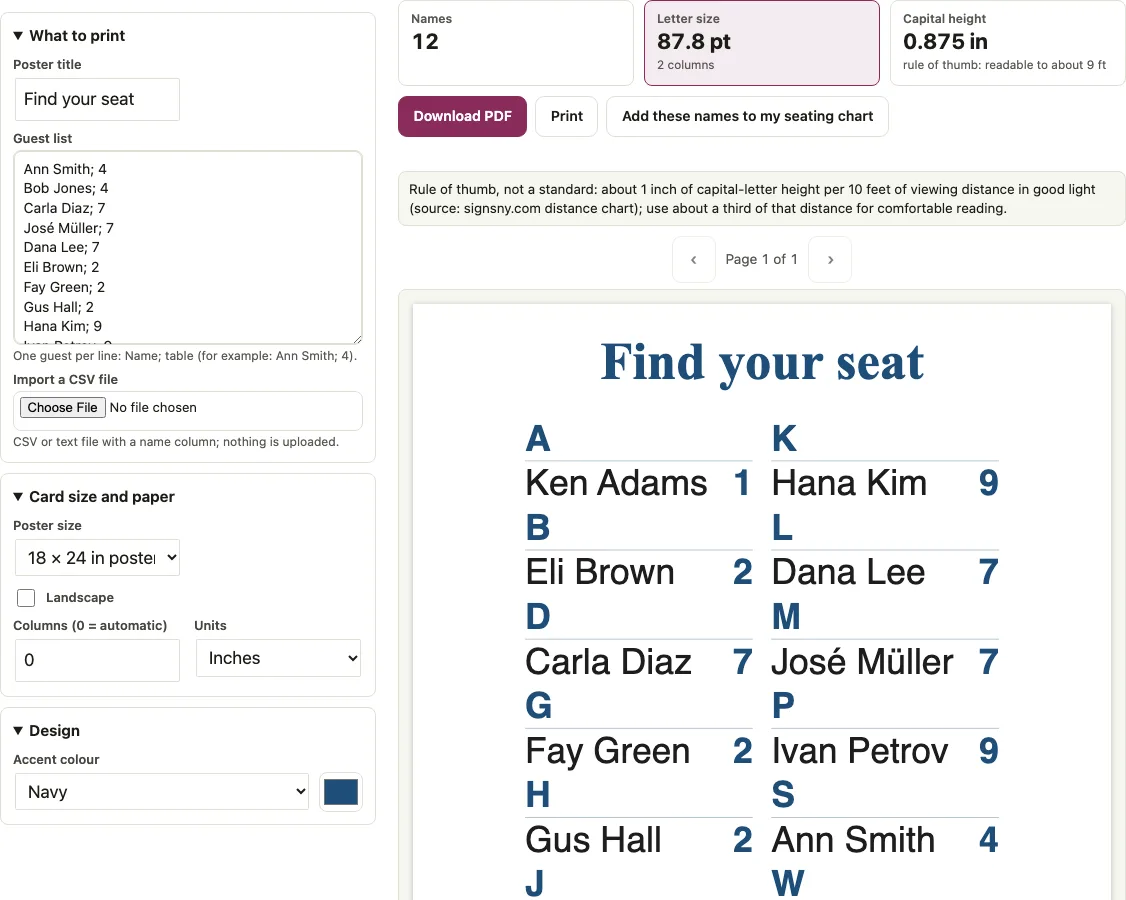
To make an alphabetical seating chart, paste each guest with a table number and download the A to Z sign sorted by surname. You get a single-page PDF at one of five poster sizes, from 18 x 24 in to Tabloid sheet, with names under letter headings. The longest name and the tallest column set the letter size, so one very long name makes the letters smaller.
Free · runs in your browser · nothing is uploaded
Recent
Your last 10 settings, saved only in this browser. Nothing is uploaded.
The Alphabetical Seating Chart Maker builds an A-to-Z seating chart from your guest list, so every guest can find a name and read the table number on one printable poster. You paste names with table numbers or import a CSV file, and the tool sorts everyone by surname under letter headings. It makes a find-your-seat sign for a wedding or party. You can choose from five poster sizes, from 18 x 24 in to Tabloid sheet, and the PDF prints as a single page at the size you pick. Below are the sorting rules, how names with prefixes and double surnames are filed, and a font-size table by guest count.
Paste your guest names with their table numbers into the Guest list box in the tool above, then check the Letter size counter before you download the PDF.
At a glance
An alphabetical seating chart is a printable A-to-Z find-your-seat sign that files each guest under the first letter of their surname, with the table number shown next to the name.
- You can choose from five poster sizes, from 18 x 24 in to Tabloid sheet, and the PDF prints as a single page at the size you pick.
- The default poster size is 18 x 24 in portrait, and the Landscape option swaps the sides.
- Columns can be left at 0 for automatic sizing or set to a number from 1 to 8.
- A warning appears when the letters are under 14 pt.
- In the page's example with 10 guests per table, a 24 x 36 in poster prints 38.2 pt letters for 100 guests, against 26.9 pt on 18 x 24 in.
Last checked:
How to use the Alphabetical Seating Chart Maker
- In the “Guest list” box, type one guest per line as Name; table, for example
Ann Smith; 4. The table can be a number or a word. A guest without a table is still listed, with an empty table column. - Write names as First Last. A comma splits the line, so
Smith, Ann; 4prints only “Smith” with table 4. - To use a file instead, click “Import a CSV file” and choose a .csv or .txt file with a name column (or first and last name columns) and a table column.
- Edit the “Poster title”. It defaults to “Find your seat”, and you can change it or leave it empty.
- Pick a “Poster size”. The default is 18 x 24 in portrait. Tick “Landscape” to swap the sides.
- Leave “Columns (0 = automatic)” at 0 to get the largest letters, or type a number from 1 to 8 to force a column count.
- Check the “Names”, “Letter size” and “Capital height” counters. A warning appears when the letters are under 14 pt.
- Download the PDF, which is a single page at the poster size.
If a seating chart is saved in this browser, the box is filled from it. The 18 x 24 in and 24 x 36 in sizes are print-shop sizes, so ask the shop to print at 100 percent or actual size. A desk printer can handle Letter, A4 or Tabloid/A3 where it is supported.
Surname sorting for the A-Z sign
The tool treats the last word of each name as the surname and files the guest under the first letter of that word. Lower-case particles in front of the surname are printed but ignored for filing, so “Bob van der Berg” sorts under B and “Mr. Tom de la Cruz” sorts under C.
“Use the N guests from my seating chart” reloads the chart’s guests and “Add these names to my seating chart” adds missing names without changing existing guests. Honorifics such as Mr. and Dr. and suffixes such as Jr. are ignored, so “Dr. Eva Cole Jr.” sorts under C. Accents are folded before sorting, which means “Élodie Durand” sorts under D as expected. A hyphenated surname counts as one word, so “Ann Smith-Jones” sorts under S, after “Ann Smith”. A single name such as Madonna sorts under M.
Double surnames follow the last-word rule, which is the English convention. “Maria Garcia Lopez” is listed under L because Lopez is the last word; under the Spanish convention of filing by the first surname she would be under G. To file her under G, type “Maria Garcia-Lopez” with a hyphen, which counts as one word. Names are filed letter by letter, so Mabry, MacArthur, Madonna and McDonald come in that order. When a letter group runs into the next column, the next column starts with the heading again as “M (cont.)”. Names that do not start with a Latin letter once folded, such as CJK names, are grouped under a # heading.
How big should the chart be?
Choose the poster size that gives the largest letters for your guest count, and check the “Letter size” counter after each change. For 100 guests a 24 x 36 in poster prints 38.2 pt letters against 26.9 pt on 18 x 24 in. The table is an example: it was computed on invented lists with names of 12.7 to 13 characters on average and 10 guests per table, set in Helvetica with automatic columns. The longest name and the tallest column set the size, not the average, so a list with one very long name prints smaller. The tool shows the real figure for your own list in the “Letter size” counter.
| Guests | Poster (portrait) | Columns | Letter size | Capital height |
|---|---|---|---|---|
| 50 | 18 x 24 in | 2 | 32.5 pt | 0.32 in |
| 100 | 18 x 24 in | 3 | 26.9 pt | 0.27 in |
| 150 | 18 x 24 in | 4 | 20.1 pt | 0.2 in |
| 200 | 18 x 24 in | 4 | 19.7 pt | 0.2 in |
| 100 | 24 x 36 in | 3 | 38.2 pt | 0.38 in |
| 150 | 24 x 36 in | 3 | 29.5 pt | 0.29 in |
| 200 | 24 x 36 in | 4 | 26.9 pt | 0.27 in |
| 300 | 24 x 36 in | 4 | 20.7 pt | 0.21 in |
Capital height is the font size times 0.718, divided by 72. The distance rule comes from the signsny.com distance chart, which calls its values estimates: it pairs 1 inch of letter height with 10 feet as the farthest distance a sign can be read, and lists a shorter “maximum impact” distance of about a third of that. The tool uses that third as its comfortable-reading figure. For example, 26.9 pt gives 0.27 in, which reads at about 3 ft at best and about 1 ft comfortably. Large signs are usually read from farther away, so use the 24 x 36 in size or fewer names per sign when guests stand back.
Short answers to common questions
How do I alphabetize a seating chart?
You do not need to sort anything by hand. Type or import each guest as a name and table, and the sign sorts A to Z by surname as it builds.
Should a seating chart be alphabetical or by table?
An alphabetical sign lets each guest look up their own name and find their table, with every guest listed once. A table-list sign groups guests under each table number instead. Both use the same “Name; table” list.
Does the chart show the table, or the seat?
The chart shows the table number next to each name. Seat assignments are made with place cards at the table.
What happens with a late RSVP?
Add the new guest as a new line in the list. The sign sorts itself again, so download the PDF once more and print it again. The list stays in this browser until you change it.
How do you sort names with prefixes or double surnames?
A lower-case surname prefix such as ‘van der’ or ‘de la’ is printed as typed but ignored for filing, so Cy van der Berg is listed under B and Tom de la Cruz under C. For double surnames, the last word is the one that counts, so “Maria Garcia Lopez” goes under L.
Why does part of a name disappear after a comma?
A comma splits the line, so “Smith, Ann; 4” prints only “Smith”, and a hint appears under the tool. Write the name as “Ann Smith; 4”, or import a CSV, which turns a quoted “Smith, Ann” cell into “Ann Smith”.
What happens to a guest without a table?
The guest is still listed in the sign, with an empty table column. You can add the table later and download the PDF again.
How big should an alphabetical seating chart be?
Choose the poster size that gives the largest letters for your guest count, and check the Letter size counter after each change. For 100 guests, a 24 x 36 in poster prints 38.2 pt letters, against 26.9 pt on 18 x 24 in. Use the 24 x 36 in size or fewer names per sign when guests stand back.
Related tools
- Wedding seating chart sign: use it when you prefer a table-by-table list on one poster.
- Escort cards: use them for small cards instead of a poster.
- Wedding table numbers: use them for numbered cards on the tables.
- Wedding place cards: use them for tent cards that mark each seat.
- Wedding seating chart maker: use it to seat the guests first and get the table numbers.
- Wedding seating chart template: use it for a printable wedding seating chart template.
- Table seating chart: use it for a banquet table list view.
- Seating chart template for Excel: use it to assign tables in a spreadsheet-style sheet.